
The paper that shows why AI gets lost in long chats
The Microsoft and Salesforce paper from the video, what it found in plain words, and the context engineering habits I use because of it. Every prompt included.
On this page
What this is
In the video I promised you the paper. Here it is: LLMs Get Lost In Multi-Turn Conversation, by researchers at Microsoft Research and Salesforce Research. Below is what it found, in plain words, and what I changed in how I use AI because of it.
It’s for anyone who has watched a long chat with ChatGPT or Claude slowly go off the rails. The habits in steps 1 to 3 are free. Step 4 is the AI brain I mentioned in the video, which is HeyBrain. Full disclosure: I co-founded it, and it has a 14-day free trial.
The paper
| Details | |
|---|---|
| Title | LLMs Get Lost In Multi-Turn Conversation |
| Authors | Philippe Laban, Hiroaki Hayashi, Yingbo Zhou and Jennifer Neville |
| From | Microsoft Research and Salesforce Research |
| Published | May 2025 on arXiv |
| Read it | arxiv.org/abs/2505.06120 (free, with a PDF link on the page) |
Most tests of AI give the model the whole task in one message. Real people don’t talk like that. We start vague, add details as we go, and correct things halfway through. The researchers wanted to know what happens to the same models when the same task arrives in pieces, across a conversation.
What they found, in plain words
They took tasks like writing code, writing database queries, maths problems and summaries, and ran each one three ways:
| Setup | What the model gets | How it did |
|---|---|---|
| Full | The whole task in one message | The baseline |
| Concat | Every piece of the task, joined into one message as bullet points | About 95% of the baseline |
| Sharded | The same pieces, one per turn, like a real conversation | Much worse |
That middle row is the important one. Concat has exactly the same information as the conversation, just in one message, and the models did almost as well as the baseline. So the problem isn’t missing information. It’s the conversation itself.
- Every model got worse. They tested 15 models, including GPT-4.1, o3, Claude 3.7 Sonnet, Gemini 2.5 Pro and DeepSeek R1. All of them did significantly worse in conversation.
- By a lot. Across six tasks, the average drop was 39%, according to the paper’s abstract. That’s from more than 200,000 simulated conversations.
- Even short chats. The drop showed up even when a task was split across just two turns.
- It’s mostly reliability, not smarts. The paper splits the drop in two. The models’ best answers got only somewhat worse (about 16%), but the gap between their best and worst answers grew a lot (about 112%). Same model, same task, wildly different results.
- Turning down the randomness didn’t save it. Lowering the model’s temperature, which usually makes answers more consistent, barely helped in conversations.
Why it happens
The researchers looked closely at where the conversations went wrong and found the same habits again and again:
- It answers too early. The model tries a full answer before it has all the details, and fills the gaps with assumptions.
- It sticks to its first guess. Later answers build on that early attempt, mistakes included, and get longer instead of better.
- It loses the middle. It pays most attention to the first and last messages. Things you said in between slip.
- It talks too much. Long replies add more assumptions of the model’s own, which then compete with what you actually said.
Where context engineering comes in
In June 2025, Shopify’s CEO Tobi Lütke wrote that he preferred the term “context engineering” to prompt engineering. About a week later Andrej Karpathy, a co-founder of OpenAI, agreed. The idea stuck because it names the real job.
Prompt engineering is about the wording of one message. Context engineering is about everything the model can see when it answers: your instructions, the facts, the documents, the chat history. Your job is to make sure the right information is in there, the wrong information isn’t, and nothing important is buried forty messages back.
One way I picture it: each time the model writes a reply, it has to decide how much weight to give each part of everything in front of it. The longer and messier that is, the easier it is for the thing that matters, like the budget you mentioned at the start, to get drowned out. The paper doesn’t test that picture directly, but it matches what they saw: the middle of a conversation gets lost.
The same request, two ways
The habits I use because of this paper
These are free and work in any AI tool. They’re mostly the paper’s own advice to users, turned into routine.
Step 1: Know when to start a new chat
The paper’s first tip for users is simple: if a conversation isn’t getting you what you want, start a new one rather than arguing with it. I start fresh when any of these happen:
Step 2: Restate everything in one message
Starting fresh only helps if you bring the important context with you. The paper’s second tip is to consolidate first: gather everything into one complete instruction, then retry. That’s exactly what the Concat test did, and it got close to full marks.
Before you leave a chat that’s gone wrong, ask it to do the gathering for you:
Consolidate before a fresh start
Open in ClaudeStop working on the task. Instead, write one complete brief I can paste into a brand new chat. Include every requirement, fact, number and decision I've given you in this conversation, including any corrections (use the corrected version only). Leave out your own earlier attempts and assumptions. If anything I said contradicts something else, list it at the end as a question for me. Format: Goal, Background, Requirements, Constraints, What done looks like.
Then open a new chat and paste it in, or write one from scratch with this shape:
One-message brief
Open in ClaudeGoal: [what I want, in one sentence] Background: [who it's for, and the situation in two or three lines] Requirements: - [must have] - [must have] Constraints: [budget, dates, length, tone, things to avoid] What done looks like: [the format and what a great answer includes] Before you start, ask me up to three questions if anything important is missing. Don't guess.
Step 3: Learn the context engineering basics
You don’t need a framework. These five rules cover most of it, and each one answers a failure from the paper:
| Rule | What it means in practice | The failure it fixes |
|---|---|---|
| Put it all up front | Give the full brief in the first message, not drip-fed over twenty | The drop in sharded chats |
| Only what’s relevant | Leave out old drafts, side tangents and docs that don’t bear on this task | Important facts getting drowned out |
| Make it ask, not guess | Tell it to ask questions before answering when something is missing | Answering too early on assumptions |
| Keep answers short | Ask for the answer first and the explanation only if you want it | Long replies full of its own assumptions |
| Use the real source | Point it at the current doc, not your memory of it or a copy from last month | Working from out-of-date facts |
The last rule is the one I couldn’t keep up by hand. My context lives in dozens of docs that change every week. Copying the right ones into each new chat is the part that broke, and it’s why step 4 exists.
Step 4: Give your AI a brain to look things up in
In the video I described an AI brain as a receiver: your docs and notes broadcasting, and the AI tuning in to only the parts that matter. The one I use is HeyBrain. Again, full disclosure: I co-founded it.
HeyBrain turns your Google Drive and Notion into one knowledge graph and connects it to your AI tools over MCP. When you ask something, the AI looks up the pieces that matter and pulls in only those, instead of re-reading everything. That’s what makes fresh chats painless: the context doesn’t have to live in the conversation, because the AI can fetch it from the source each time. The same brain works in the Claude app, Claude Code, Cursor and Codex.

Set up HeyBrain
- Start your 14-day free trial and create your workspace.
- Connect Google Drive, Notion or both, and choose what HeyBrain can read.
- Let it finish reading. Your docs appear in your HeyBrain library as they’re added.
Connect the Claude app
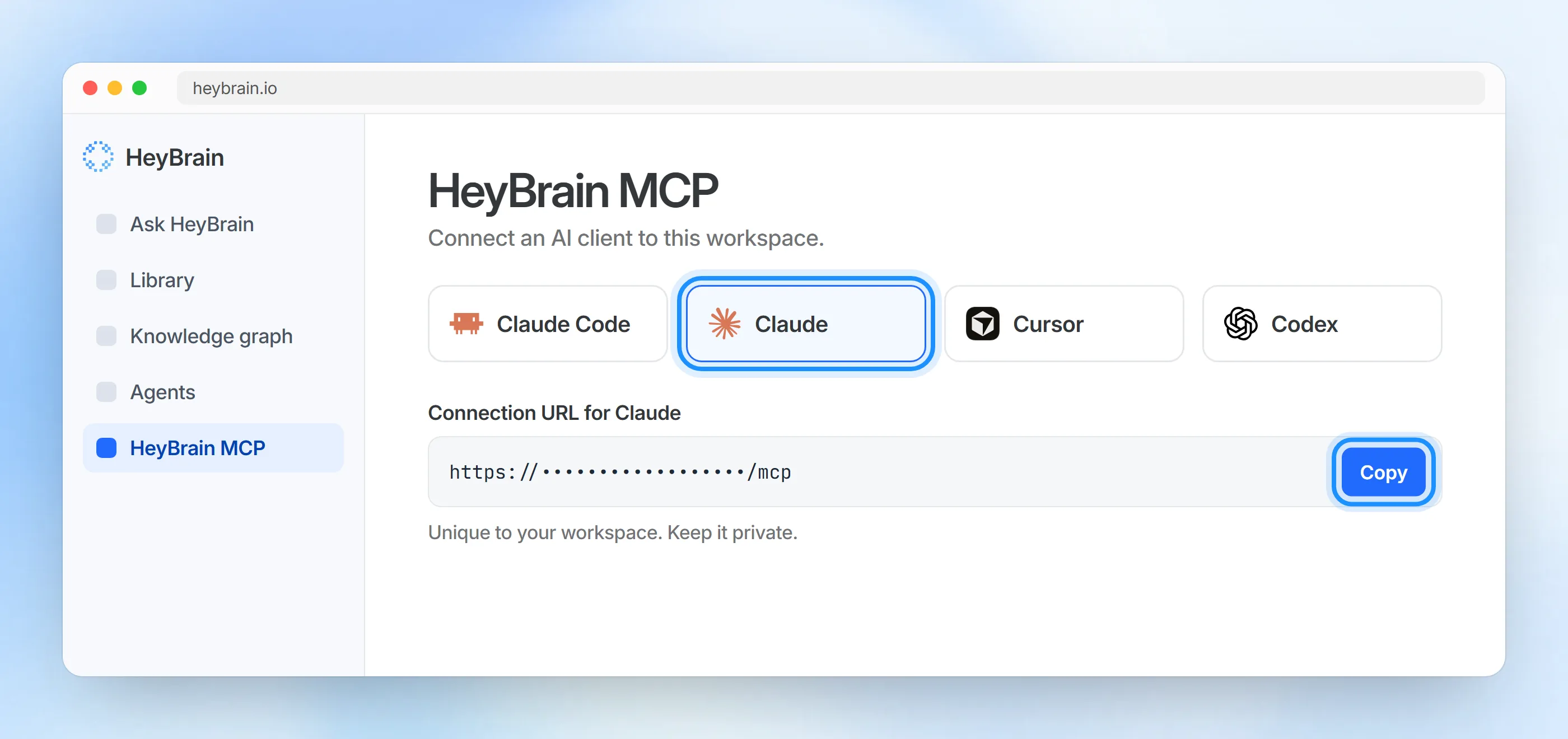
1. In HeyBrain, open HeyBrain MCP, choose Claude and copy your connection URL. It’s unique to your workspace, so keep it private.
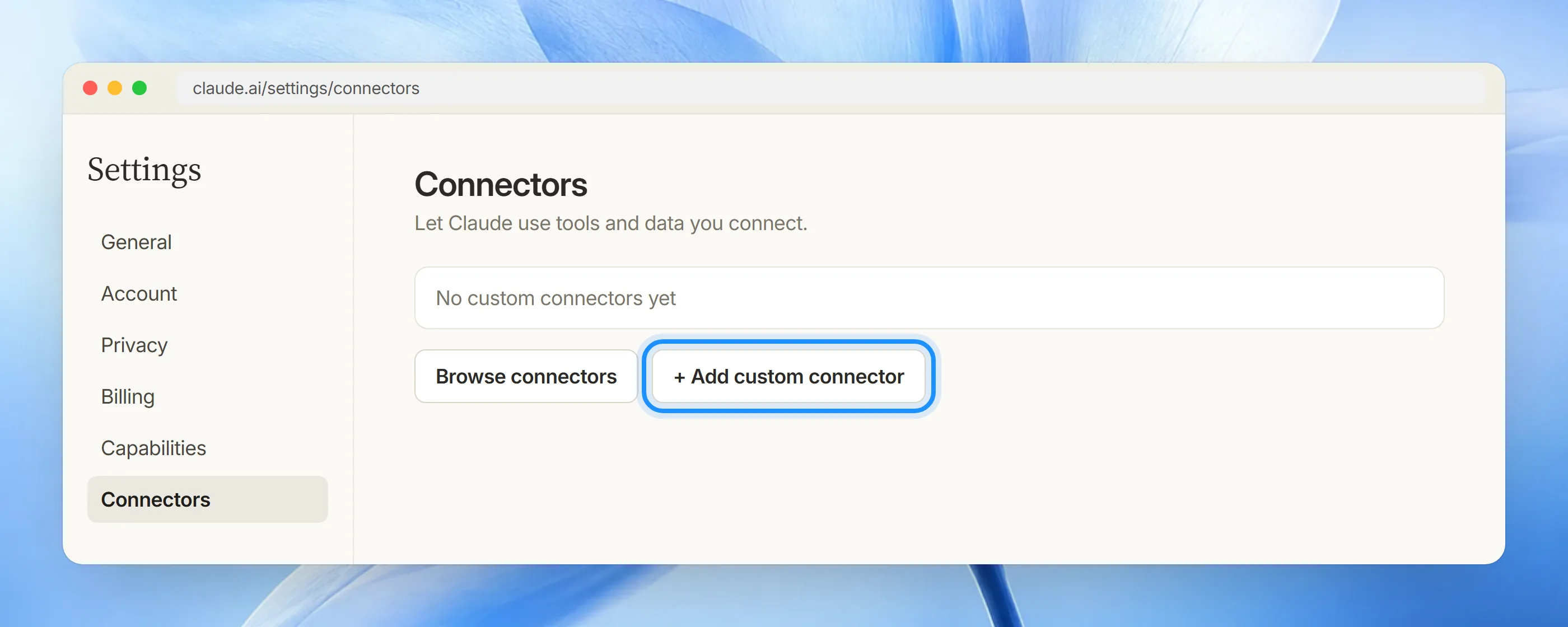
2. In Claude, open Customize → Connectors, click + Add and then Add custom connector.
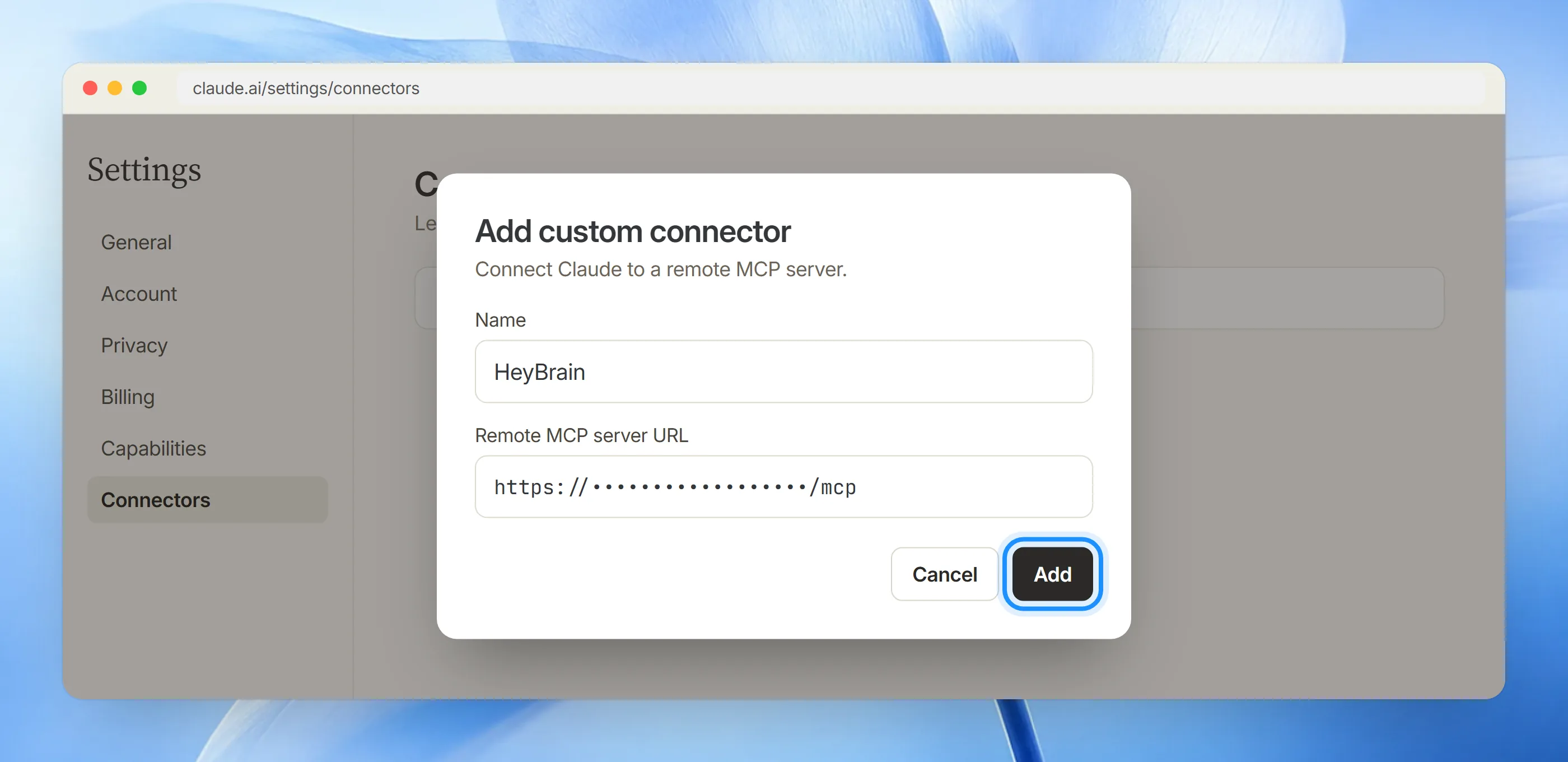
3. Name it HeyBrain, paste the URL and click Add. Sign in to HeyBrain when it asks, and click Allow.
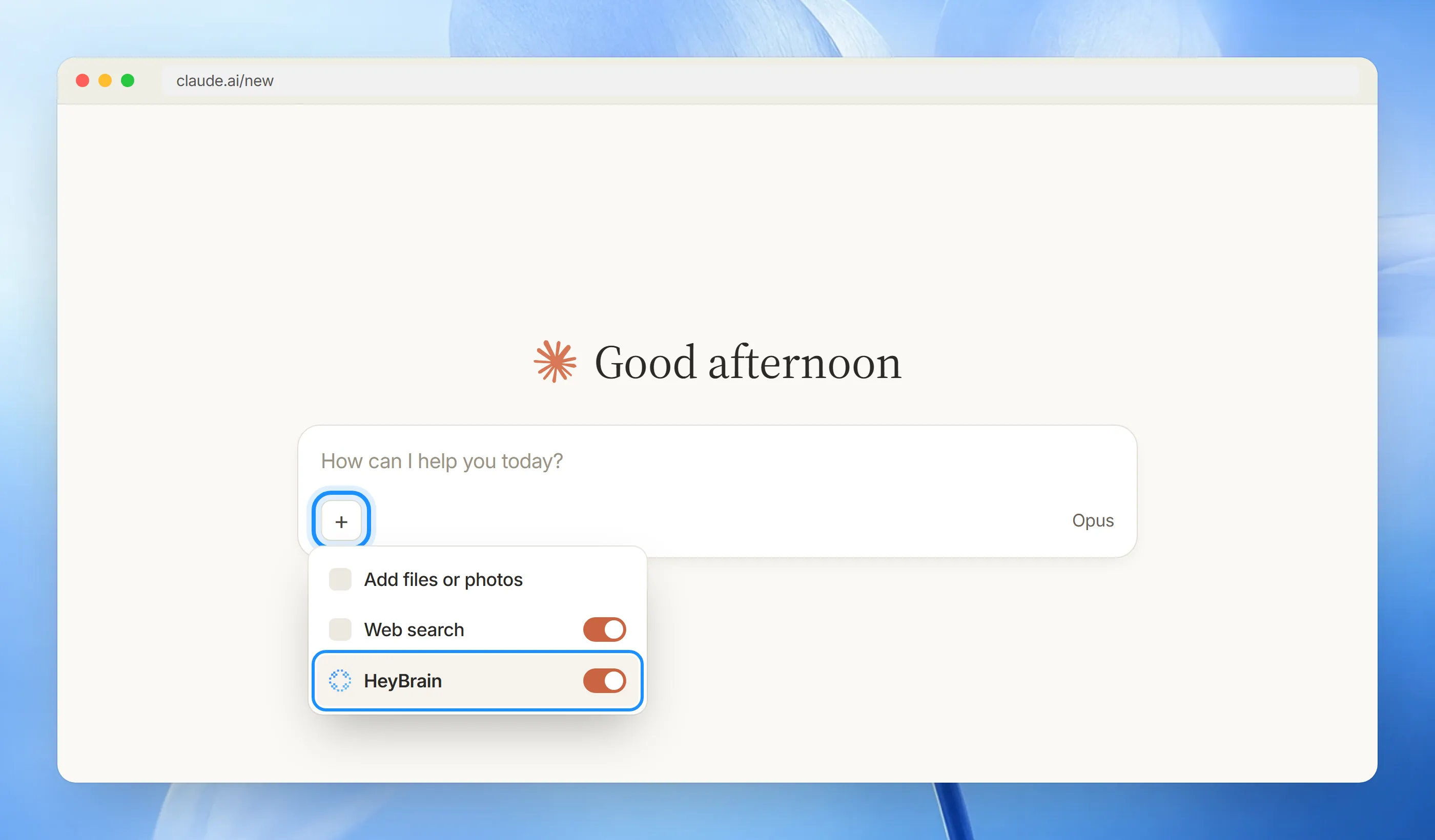
4. In a new chat, click the +, open Connectors and switch HeyBrain on.
Using Claude Code?
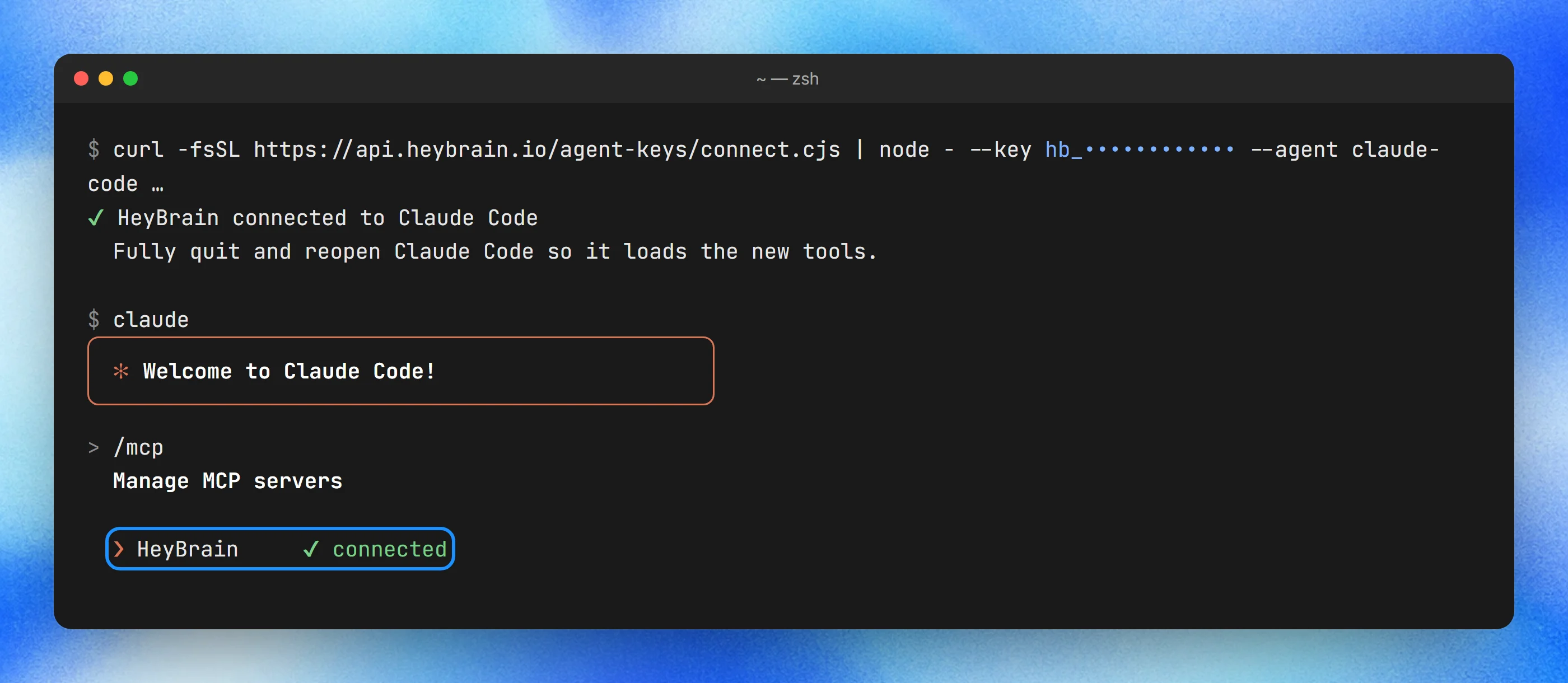
In HeyBrain, open HeyBrain MCP, choose Claude Code and copy the command it shows you. It carries your own key, so keep it private.
Paste it into your terminal and run it. Then fully quit and reopen Claude Code so it loads the new tools.
Type /mcp in Claude Code. You should see HeyBrain in the list, marked as connected. Cursor and Codex are on the same HeyBrain MCP page.
Step 5: Use these templates instead of long chats
These are the prompts I reach for most. The first four work best with HeyBrain switched on. The last one works anywhere.
Fresh start with my context
Open in ClaudeNew chat, fresh start. Before you answer, use HeyBrain to find what you need about [the project, client or topic]: the latest decisions, the numbers, and anything still open. Tell me in five bullet points what you found and which documents it came from. Then wait for my request.
Pick up where I left off
Open in ClaudeI'm continuing work on [the project]. Use HeyBrain to find my latest notes and the brief for it. Summarise where things stand in three lines, list what's still open, and ask me which one to do first. Don't start any work until I answer.
Ask before you answer
Open in ClaudeHere's what I need: [the task]. Before you write anything, use HeyBrain to check my docs for what's relevant, then ask me up to three questions about anything that's still missing or unclear. Only start once I've answered. Keep the final answer short, and name the documents you used.
Check the context is current
Open in ClaudeUse HeyBrain to find the most recent version of [the doc or topic]. Tell me when it was last changed and quote the key line I should rely on. If you find two versions that disagree, show me both.
Are you lost?
Open in ClaudePause. Without writing a new answer, list: 1. Every requirement I've given you in this chat, in one line each. 2. Any assumption you made that I didn't actually state. 3. Anything I said that you may have dropped. If the list shows you've drifted, say so, and I'll start a fresh chat with the corrected brief.
Cheat sheet
| When this happens | Do this |
|---|---|
| It forgets something you said earlier | Consolidate (step 2), then start a new chat |
| You’ve corrected it twice | Stop correcting. New chat, full brief |
| You’re starting a big task | One-message brief, and let it ask questions first |
| Answers keep getting longer | Ask for the answer first, explanation only on request |
| You’re pasting the same docs again | Let the AI look them up from the source instead |
| You switch to a different job | New chat. Don’t carry old context into new work |
My take, not the paper’s: the models will keep getting better at long conversations, and the authors expect their advice to become unnecessary one day. But the habit of giving AI the right context, cleanly, will matter whatever model you use. That’s the bit worth learning now.
Questions people ask
Where can I read the full paper?
On arXiv, free: arxiv.org/abs/2505.06120. The page has a link to the PDF.
Does this still apply to newer models?
The paper tested 15 models from early 2025. Newer models have come out since, and the authors expect future models to handle conversations better. The habits in this guide cost nothing, so they’re worth using either way.
Isn’t a bigger context window the fix?
Not on its own. A bigger window lets the model see more, but the paper’s problem wasn’t running out of room. It was the model making early guesses and losing track of what was said in the middle. Less, better context helps more than more context.
Does HeyBrain work with ChatGPT?
Today HeyBrain connects to Claude, Claude Code, Cursor and Codex. The free habits in steps 1 to 3 work in any AI tool, ChatGPT included.
What does it cost?
Steps 1 to 3 are free. HeyBrain has a 14-day free trial with a card required, then a paid plan. See pricing.
Is my data used to train models?
No. HeyBrain doesn’t train any model on the content you connect.

