
Beyond prompting: five AI concepts to learn next
RAG, MCP servers, skills, agent harnesses and LLM as a judge, explained for software engineers. Each one with the tools to use and a small exercise to try.
On this page
What this is
If you came from my video, this is the summary I promised. Prompting is the first layer of working with AI. The engineers getting the most out of it are building the systems around the model: what it knows, what it can touch, how it runs and how its work gets checked. Here are the five concepts I’d study next, in plain words, each with the tools to try and one small exercise.
It’s written for software engineers, but you don’t need an ML background. One of the tools under RAG is HeyBrain, which has a 14-day free trial. Full disclosure: I co-founded it.
The five concepts at a glance
| Concept | In one line | Tools to try |
|---|---|---|
| 1. RAG | Give the model your knowledge at question time | LlamaIndex, Pinecone, a managed knowledge layer |
| 2. MCP servers | A standard way to plug AI into tools and data | GitHub, Supabase and Notion servers; Claude, ChatGPT, Cursor as clients |
| 3. Plugins and skills | Teach the agent how you do a job, and package it | Agent Skills, Claude Code plugins |
| 4. Agent harnesses | The loop, tools and memory around the model | Claude Code, Codex, OpenCode |
| 5. LLM as a judge | A second model scores the first one’s work | Braintrust, Promptfoo |
Each one builds on the last. A harness runs the loop, MCP gives it tools, RAG gives it knowledge, skills tell it how you work, and a judge checks the result.
Step 1: RAG: give the model your knowledge
A model only knows what it was trained on and what’s in the prompt. It has never seen your internal docs, your codebase or last week’s design decision. Retrieval-augmented generation (RAG) fixes that: when a question comes in, you look up the most relevant pieces of your own content and put them in the prompt, so the model answers from them.
Under the hood, a RAG pipeline has six parts:
- Load. Read your docs, code, tickets or wiki pages.
- Chunk. Split them into passages small enough to make sense on their own.
- Embed. Turn each chunk into a vector, a list of numbers that captures its meaning.
- Store. Keep those vectors in a vector database.
- Retrieve. Embed the question and fetch the chunks closest to it.
- Generate. Put those chunks in the prompt and let the model answer from them.
The tools
| Tool | What it does |
|---|---|
| LlamaIndex | An open-source Python framework for building RAG and agents over your data: loaders, indexes, query engines |
| Pinecone | A hosted vector database. It can create the embeddings for you, and it has a free Starter plan |
Try it
Put a handful of real docs in a docs folder (a README, a runbook, an ADR) and run the smallest RAG there is. It needs pip install llama-index and an OPENAI_API_KEY, because LlamaIndex uses OpenAI by default.
rag_starter.py
Open in Claudefrom llama_index.core import SimpleDirectoryReader, VectorStoreIndex
documents = SimpleDirectoryReader("docs").load_data()
index = VectorStoreIndex.from_documents(documents)
query_engine = index.as_query_engine()
print(query_engine.query("How do we roll back a failed deploy?"))Then let Claude Code or Cursor grow it into something you can learn from:
Make retrieval visible
Open in ClaudeExtend rag_starter.py so I can see how retrieval works: 1. Take the question from the command line. 2. Under each answer, print the file name and the text of every chunk that was retrieved, with its similarity score. 3. Add a setting for chunk size and top-k, so I can compare results. 4. Then add an option to store the vectors in Pinecone instead of memory, using PineconeVectorStore from llama-index-vector-stores-pinecone. Keep it in one file and tell me which environment variables it needs.
Or skip the pipeline. A managed knowledge layer like HeyBrain does the loading, indexing and retrieval for you: it turns your Google Drive and Notion into a knowledge graph your AI can search over MCP, and it keeps up as the docs change. That’s what I use day to day, and the setup is in step 6.
Step 2: MCP servers: plug AI into real tools
The Model Context Protocol (MCP) is an open standard for connecting AI apps to tools and data. An MCP server wraps something, like GitHub, a database or an API, and exposes it as tools the model can call. An MCP client is the AI app that calls them. Write the server once and every client can use it.
Claude, ChatGPT, Cursor and VS Code all support MCP as clients, and most developer tools now ship a server. Three worth knowing:
| Server | What the AI can do with it |
|---|---|
| GitHub | Read repos and code, manage issues and pull requests, look at Actions runs |
| Supabase | List tables, run SQL, apply migrations, read logs, generate TypeScript types |
| Notion | Search your workspace, create and edit pages, manage databases |
Try it
Connect GitHub to Claude Code. Use a personal access token with read-only access for now.
- In a terminal, run
claude mcp add-json github '{"type":"http","url":"https://api.githubcopilot.com/mcp","headers":{"Authorization":"Bearer YOUR_GITHUB_PAT"}}' - Start Claude Code and type
/mcpto check GitHub shows as connected. - Ask it something that needs live data from your repos.
Test the GitHub server
Open in ClaudeUse the GitHub MCP server to list the open pull requests in [owner/repo] with no review activity in the last week. For each one, give me the title, the author and one line on what it changes. Don’t comment on or change anything.
In Cursor, servers go in .cursor/mcp.json for one project or ~/.cursor/mcp.json for all of them. For a database, Supabase’s server lives at https://mcp.supabase.com/mcp. Add ?read_only=true so queries run as a read-only user, and point it at a dev project.
Step 3: Plugins and skills: teach it how you work
MCP gives the agent tools. Skills give it know-how. A skill is a folder with a SKILL.md file: a name, a one-line description of when to use it, and the steps for doing the job your way. The agent only sees the name and description until a task matches, then it loads the full instructions. So you can keep lots of skills around without filling the context window.
Agent Skills is the open format behind this. Anthropic started it, and it’s now read by a growing list of agent tools, so a skill you write isn’t locked to one of them.
A Claude Code plugin is the packaging layer: one installable unit that can bundle skills, subagents, hooks and MCP servers. Run /plugin in Claude Code and browse the Discover tab to see what’s in Anthropic’s marketplace.
Try it
Pick a job you keep explaining to the AI, and turn it into a skill:
Turn a repeated job into a skill
Open in ClaudeI keep giving you the same instructions for [a repeated job, for example writing a PR description or reviewing a database migration]. Ask me how I do it today, what good looks like and the mistakes to avoid. One question at a time. Then write it as a skill: a folder at .claude/skills/[skill-name]/ with a SKILL.md that has a name, a description that says when to use it, and the steps. Keep SKILL.md short, and put any long reference material in a separate file it links to.
Test it by typing /skill-name in Claude Code, then try a task that should trigger it without the slash. If it doesn’t load on its own, the description is too vague.
Step 4: Agent harnesses: the system around the model
A model on its own takes text in and gives text back. The harness is everything around it that turns it into an agent:
- The loop. Plan, call a tool, read the result, decide the next step, repeat until done.
- The tools. Read files, run commands, edit code, call MCP servers.
- Context management. What goes into the window, what gets summarised, what gets left out.
- Memory. Project instructions it reads at the start of every session.
- Permissions. What it can do on its own and what needs your approval.
Two harnesses running the same model can behave very differently, because the harness decides what the model sees and can do. Three to know:
| Harness | Made by | Worth knowing |
|---|---|---|
| Claude Code | Anthropic | Reads CLAUDE.md every session; skills, plugins, subagents and MCP |
| Codex | OpenAI | Works on your local repo from the terminal; /init writes an AGENTS.md; MCP with codex mcp |
| OpenCode | Open source | Terminal or desktop app; works with many model providers; MCP servers |
All three speak MCP, so the servers from step 2 work in each of them.
Try it
Give two harnesses the same small, real task in the same repo, and make each one show its working. You’ll learn more about how agents behave from comparing the two than from any diagram.
Make the loop visible
Open in ClaudeBefore you change anything, walk me through how you'll handle this task: which files you'll read, which commands you'll run, and how you'll check the change works before you say you're done. Then do it. At the end, list every tool call you made, in order, with one line on why. Task: [a small real bug or refactor in this repo]
Step 5: LLM as a judge: AI that checks AI
Unit tests work when there’s one right answer. A lot of AI output doesn’t have one: a summary, a commit message, a code review. LLM as a judge means giving a second model the output and a clear rubric, and having it return a score and a reason. Run it over a set of test cases and you can tell whether a prompt change, a new model or a new skill made things better or worse.
It works well for code reviews: one model writes the change, another reviews it against your standards.
The tools
| Tool | What it does |
|---|---|
| Braintrust | An evals and observability platform. Its LLM-as-a-judge scorers run in offline evals and on production logs, and its open-source autoevals library has ready-made judges like Factuality |
| Promptfoo | An open-source CLI for evaluating and red-teaming LLM apps. Evals run on your machine, and its llm-rubric check is a judge you describe in plain words |
Try it
Save this as promptfooconfig.yaml, run npx promptfoo@latest eval, then npx promptfoo@latest view to see the scores in your browser. Add more test cases from your own git history.
promptfooconfig.yaml
Open in Claudeprompts:
- "Write a git commit message for this diff: {{diff}}"
providers:
- openai:gpt-5
tests:
- vars:
diff: |
- return price * qty
+ return round(price * qty, 2)
assert:
- type: llm-rubric
value: A single line in the imperative mood that says prices are now rounded, with no invented detailsAnd a judge prompt you can use for code reviews in any chat or harness:
Code review judge
Open in ClaudeYou're reviewing a code change written by another AI. You didn't write it, so don't defend it.
Score it from 1 to 5 on each of: correctness, test coverage, readability, and fit with the rest of the codebase. For every score below 4, quote the lines and say what you'd change.
Return JSON only:
{"scores": {"correctness": 0, "tests": 0, "readability": 0, "fit": 0}, "issues": [{"line": "", "problem": "", "fix": ""}], "verdict": "approve or request changes"}
The diff:
[paste the diff]Step 6: Put it together: a knowledge layer over MCP
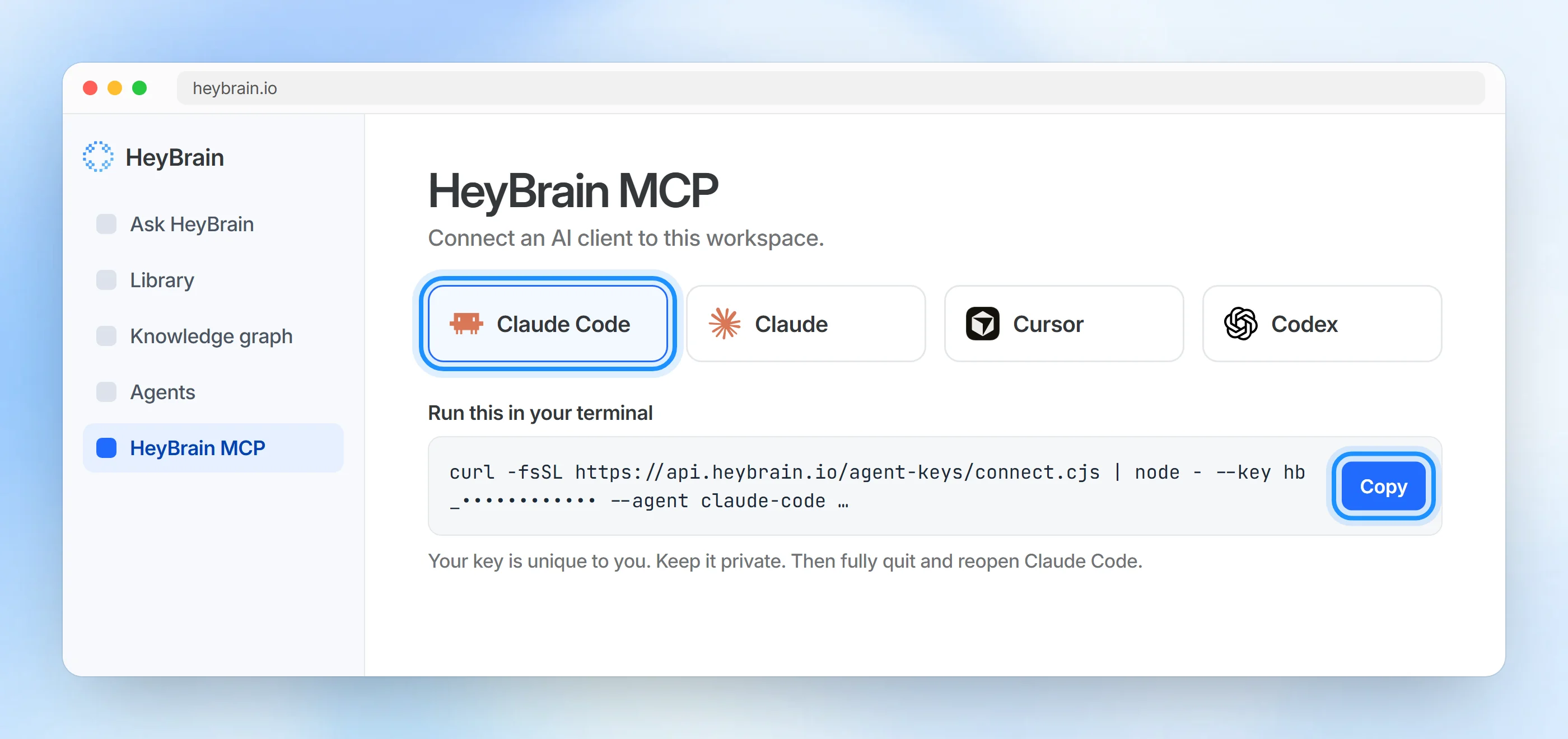
This is concepts 1 and 2 in one: retrieval over your team’s docs, served to your harness as an MCP server. HeyBrain turns your Google Drive and Notion into one knowledge graph. When you ask something, the agent looks up the pieces that matter and pulls in only those, instead of re-reading everything. The same brain works in Claude, Claude Code, Cursor and Codex, and your team reads the same one.

Set up HeyBrain
- Start your 14-day free trial and create your workspace.
- Connect Google Drive or Notion, and choose what HeyBrain can read.
Connect Claude Code
- In HeyBrain, open HeyBrain MCP, choose Claude Code and follow the steps it shows. If it gives you a session key, keep it private.
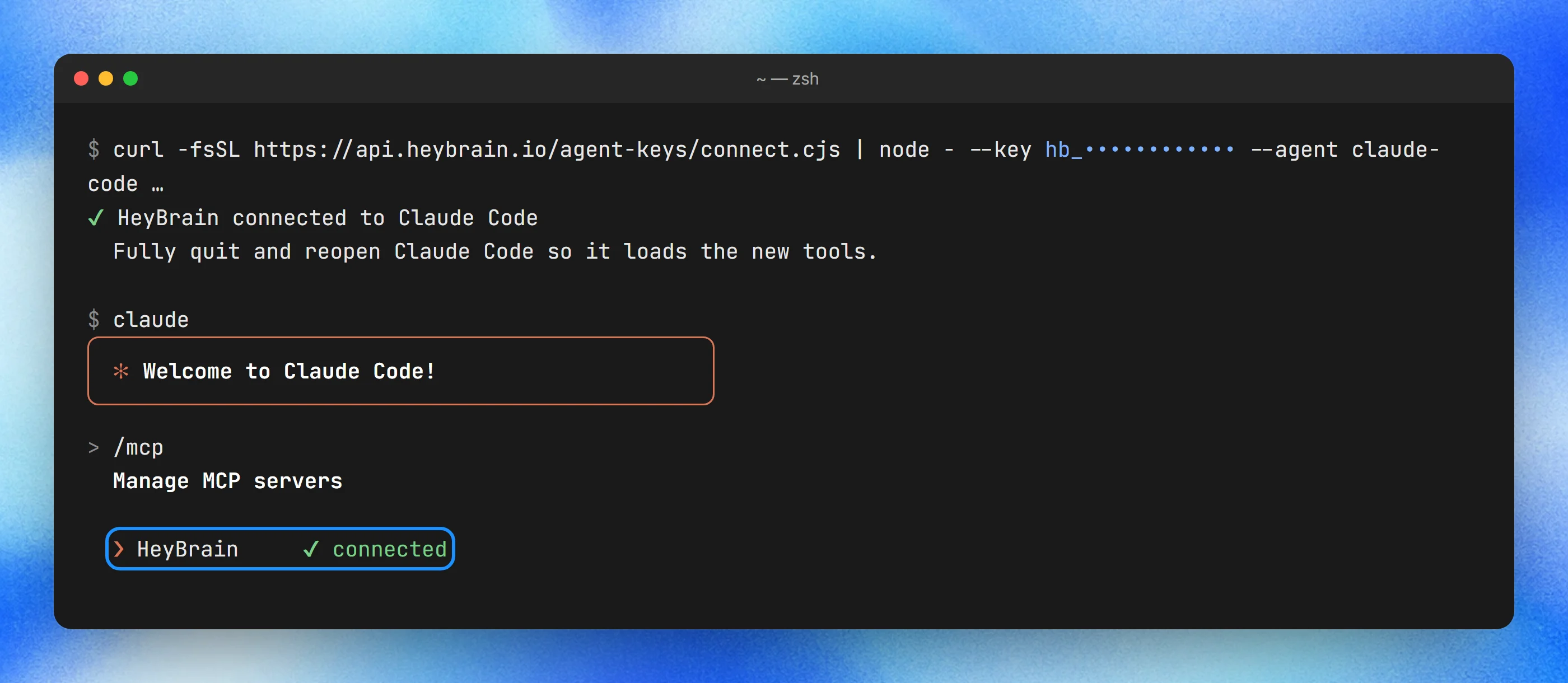
- Run the command it shows you in a terminal.
- Fully quit and reopen Claude Code so it loads the new tools.
- Type /mcp and find HeyBrain, listed as aivm-brain. If it asks you to authenticate, select it, choose Authenticate and sign in.
Using the Claude app, Cursor or Codex?
Claude app: in HeyBrain, open HeyBrain MCP, choose Claude Desktop and copy your MCP URL. It’s your workspace’s endpoint, so don’t post it anywhere public. In Claude, open Customize → Connectors, select Add, then Add custom connector. Name it HeyBrain, paste the URL, click Continue, then Add. Click Connect, sign in and allow access, then in a chat click + and switch HeyBrain on. On a Team or Enterprise plan, an Owner adds the connector under Organization settings → Connectors first.
Cursor and Codex: they’re on the same HeyBrain MCP page. Pick yours and follow the steps it shows.
Check it can see your docs, then combine it with the judge from step 5:
Check the knowledge layer
Open in ClaudeUse HeyBrain to list the five most recent documents about our engineering work, with one decision or open question from each.
Review against our own guidelines
Open in ClaudeUse HeyBrain to find our code review guidelines and any docs about [the area this change touches]. Name the documents you used. Then review this diff against them as a strict reviewer. For each problem, quote the line, cite the guideline it breaks and suggest a fix. End with approve or request changes. [paste the diff]
How the five fit together
Here’s one workflow that uses all five. You ask your harness to fix a bug. It retrieves the relevant design doc (RAG), opens the issue and the failing CI run through GitHub (MCP), follows your bug-fix skill, makes the change in a loop until the tests pass (harness), and a second model reviews the diff before you see it (judge).
Your study list, one exercise per concept:
Questions people ask
Do I need all five to get started?
No. Start with a harness and one MCP server, since that’s where you’ll feel the difference first. Add skills when you catch yourself repeating instructions, RAG when the agent keeps missing context, and a judge when you start changing prompts and models and want to know if it helped.
Do I still need RAG now that context windows are huge?
Usually, yes. Your docs rarely fit in one prompt, they keep changing, and sending everything on every request costs tokens. Retrieval sends the pieces that matter.
What’s the difference between a skill, a plugin and an MCP server?
An MCP server gives the agent tools and data. A skill tells it how to do a job. A plugin packages skills, subagents, hooks and MCP servers so you can install them together.
Does HeyBrain work with ChatGPT?
Today HeyBrain connects to Claude, Claude Code, Cursor and Codex.
What does it cost?
LlamaIndex and Promptfoo are open source, and Pinecone has a free Starter plan. You’ll pay for the model calls they make. HeyBrain has a 14-day free trial with a card required, then a paid plan. See pricing.
Is my data used to train models?
No. HeyBrain doesn’t train any model on the content you connect.

