
Four plugins for Claude Code’s token limit
The four tools from the video, with the links, what each one really does, how to install it and what to watch out for.
On this page
What this is
If you came from my video, these are the four tools I promised, with the links and what each one really does. Claude Code is brilliant right up until it hits your usage limit halfway through a task. These four help from different sides: less code written, a backup when the limit runs out, less re-reading, and a better way of working.
Two are Claude Code plugins, one is a gateway you run on your own machine, and one is a memory you connect over MCP. That third one is HeyBrain. Full disclosure: I co-founded it, and it has a 14-day free trial. I checked each tool against its own repo, so where the video was short on detail or a caution, you’ll find it here.
The four at a glance
| Tool | What it helps with | What it is |
|---|---|---|
| 1. Ponytail | Claude Code writing more code than the task needs | Free Claude Code plugin |
| 2. OmniRoute | Getting stuck when your limit runs out | Free gateway you run on your computer |
| 3. HeyBrain | Re-reading the same docs and files every session | MCP connection to your Drive and Notion |
| 4. AgentSkills | Rework from building before planning | Free Claude Code plugin |
Step 1: Ponytail: write only what the task needs
Ponytail is an open-source skill by Dietrich Gebert that tells Claude Code to write only what the task needs. Before it writes anything, it asks whether the code needs to exist at all, whether something already in your project or the standard library does the job, and only then writes the smallest version that works.
Less code written means fewer output tokens, and less code for you to review later. In the author’s own benchmark (39 tasks in Claude Code), it wrote 53% less code than the same agent without it. That’s the project’s number, not mine, so treat it as a guide. The README also says it never cuts validation, error handling, security or accessibility.
Install it inside Claude Code, one line at a time:
Install Ponytail
Open in Claude/plugin marketplace add DietrichGebert/ponytail /plugin install ponytail@ponytail
/ponytail lite,/ponytail full,/ponytail ultraor/ponytail offchanges how hard it pushes./ponytail-reviewreviews your current changes for bugs, security and anything it would cut.- It also works in Codex, Cursor, Gemini CLI and other agents. The repo’s install guide has the steps for each.
Step 2: OmniRoute: a backup when your limit runs out
OmniRoute is an open-source AI gateway you run on your own computer. You connect the AI providers you have accounts with, many of which have free tiers, and point Claude Code at OmniRoute instead of straight at Anthropic. When one provider hits its limit, OmniRoute moves your requests to the next one you’ve set up.
It isn’t free, unlimited Claude. Once it falls back, you’re working with a different model, and the quality changes with it. Each provider sets its own limits and terms, and you bring your own accounts.
- Install it with
npm install -g omniroute, then runomnirouteto start it. - Set an admin password straight away (
omniroute setupwalks you through it), then open the dashboard athttp://localhost:20128and connect the providers you want to fall back to. - Connect Claude Code.
omniroute run claudestarts Claude Code through OmniRoute without changing your settings. Or runomniroute setup-claudeto write a Claude Code profile for each model, and start one withomniroute launch --profile <name>. - Test it: in that session, ask Claude Code to say hello and check you get a reply.
Step 3: HeyBrain: stop re-reading the same files
This is the third tool from the video, and the one I built. A lot of what eats your limit is Claude Code reading things it has read before: the same docs and notes, pasted in or opened again every session.
HeyBrain turns your Google Drive and Notion into one knowledge graph and connects it to Claude Code over MCP. When you ask something, Claude looks up the pieces that matter and pulls in only those, instead of re-reading everything. Because the brain sits outside Claude Code, the same one works in the Claude app, Cursor and Codex, so you can switch tools and keep your context. Your team reads the same brain too.

Connect it to Claude Code
- Start your 14-day free trial and create your workspace.
- Connect Google Drive or Notion so HeyBrain can build your knowledge graph.
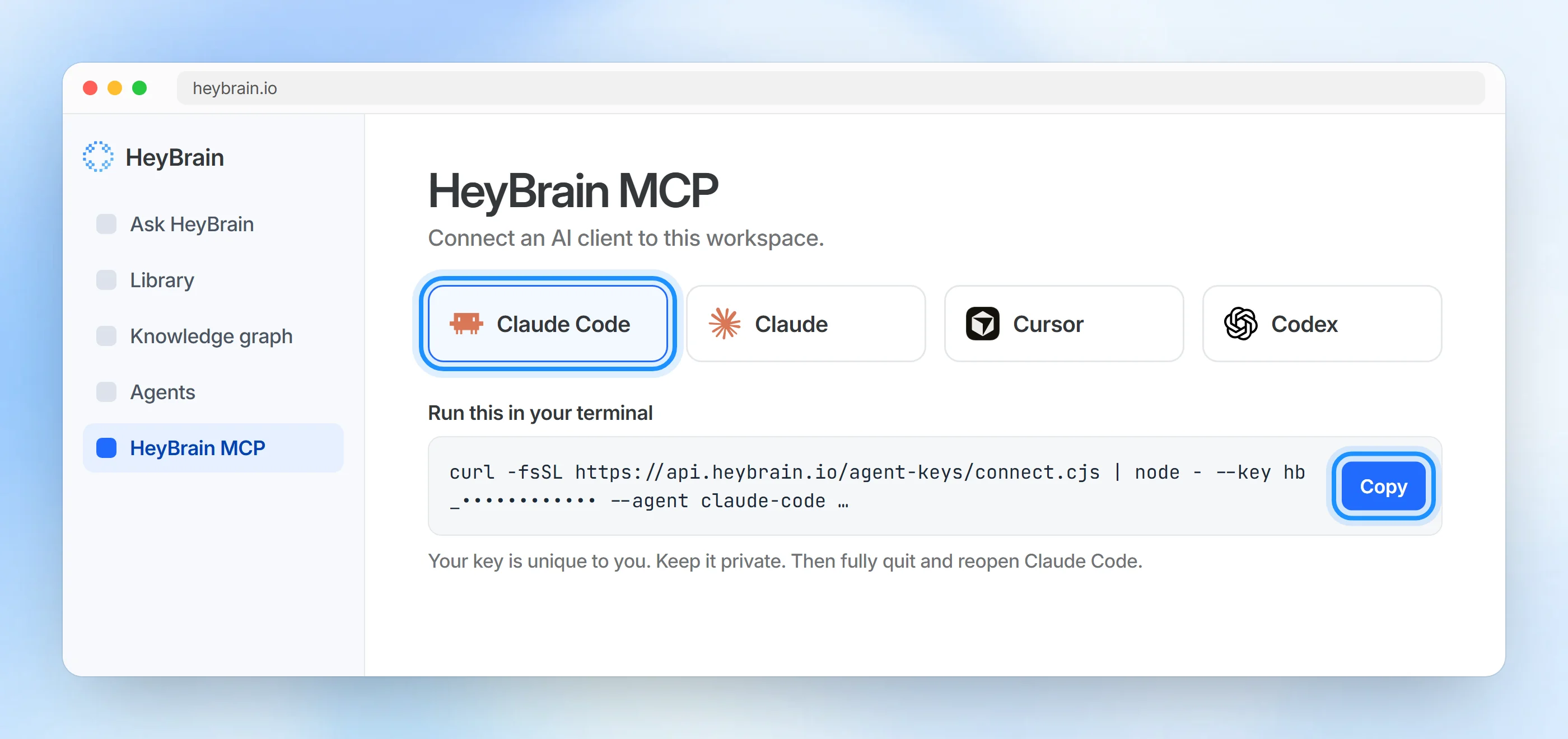
- In HeyBrain, open HeyBrain MCP, choose Claude Code and copy the command. It carries your own key, so keep it private.
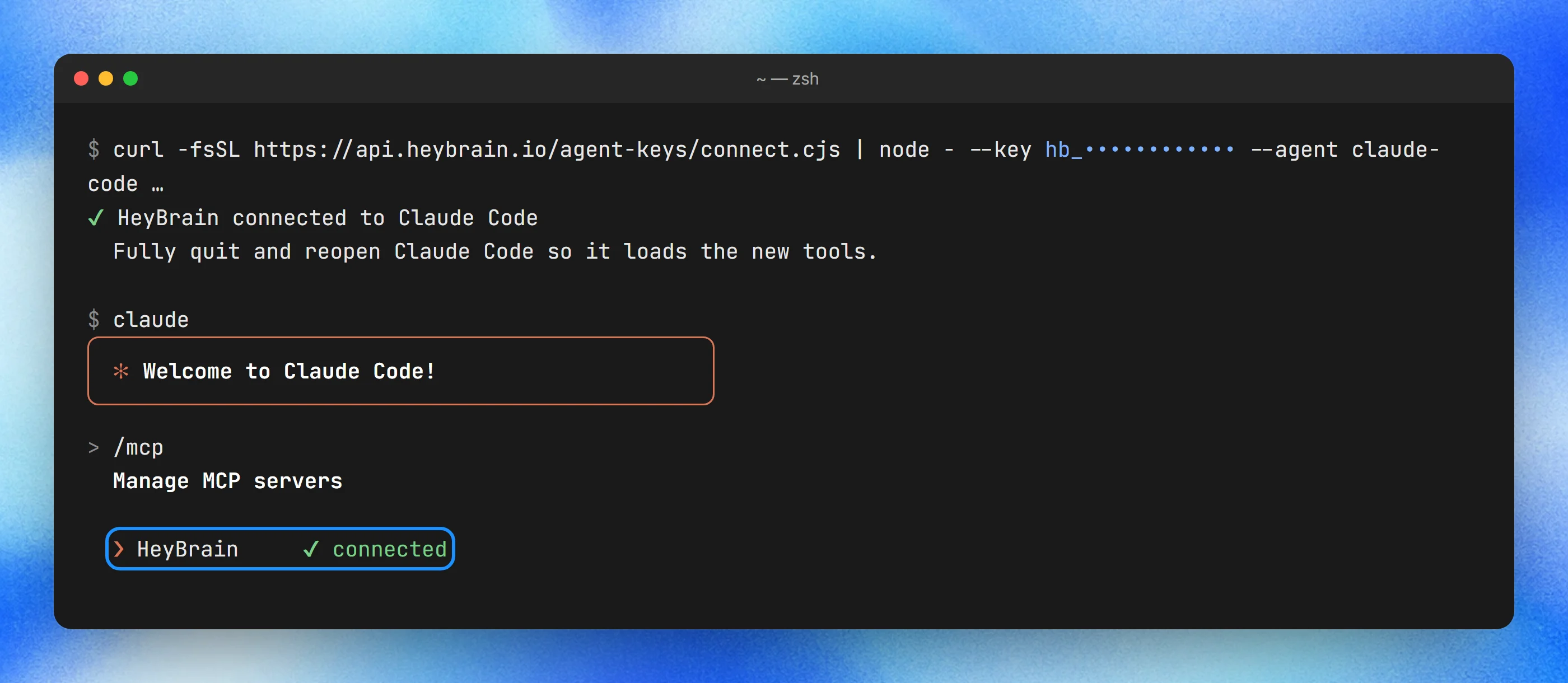
- Paste it into a terminal and run it. Then fully quit and reopen Claude Code.
- Type /mcp in Claude Code. You should see HeyBrain in the list, marked as connected.
Using Cursor, Codex or the Claude app as well?
Cursor and Codex are on the same HeyBrain MCP page. Choose the one you use and follow the steps it shows.
For the Claude app, choose Claude and copy your connection URL. It’s unique to your workspace, so keep it private. In Claude, open Customize → Connectors, click + Add, then Add custom connector. Name it HeyBrain, paste the URL, follow the prompts and click Add. Sign in to HeyBrain and click Allow, then switch HeyBrain on under + → Connectors in a new chat.
Then ask Claude Code to look things up before it opens files:
Look it up first
Open in ClaudeBefore you open or re-read any files, use HeyBrain to find what we already know about [the feature, client or topic]. Pull in only the docs you need, name them, and then start the task.
Check what it knows
Open in ClaudeUse HeyBrain to tell me what you know about my business. List the five most recent documents, and one decision or open question from each.
Step 4: AgentSkills: work like a senior engineer
AgentSkills is an open-source pack of engineering skills by Addy Osmani, a longtime Google engineering leader who now works on Claude Code at Anthropic. Each skill is a written workflow for one stage of the job: shaping the idea, planning, building, testing, reviewing and shipping.
You don’t have to call them. Skills switch on by themselves based on what you’re doing: design an API and the API skill kicks in, build a screen and the frontend one does. The README lists 25 skills plus a meta-skill that maps your work to the right one.
It won’t shrink your limit on its own. Where it helps is rework: a spec and a plan before you build means fewer rounds of Claude Code fixing its own work, and those rounds are where a lot of tokens go.
Install AgentSkills
Open in Claude/plugin marketplace add addyosmani/agent-skills /plugin install agent-skills@addy-agent-skills
| Command | Stage |
|---|---|
/spec | Write down what you’re building before you build it |
/plan | Break the work into small tasks |
/build | Build it one task at a time |
/test | Test what was built |
/agent-skills:review | Review the code (namespaced, because Claude Code has its own /review) |
/ship | Get it ready to launch |
Try it on your next feature
Open in ClaudeI want to build [the feature, in a sentence or two]. Use the agent-skills workflow: write a short spec first, then a plan broken into small tasks. Wait for my OK before you build anything.
The order I’d set them up in
- Ponytail and AgentSkills first. Both are free and install inside Claude Code.
- HeyBrain next, if you keep feeding Claude Code the same context, or you switch between Claude Code, Cursor and Codex.
- OmniRoute last, if at all. Only once you’ve read the security note and you’re happy to run it on your own machine.
Where your limit goes
Questions people ask
Are these official Claude Code plugins?
No. Ponytail, OmniRoute and AgentSkills are open-source projects by independent developers, and HeyBrain is my company’s product. Install only from the repos linked here, and read what a plugin does before you add it.
Is OmniRoute safe to use?
It had a critical security flaw, which GitHub’s advisory lists as fixed in version 3.8.49. Use the latest version, keep login on with a password, and keep it on your own machine. If that’s more than you want to manage, skip it. The other three don’t need it.
Do I need all four?
No. Each one works on its own. Ponytail and AgentSkills are the easiest place to start.
Does HeyBrain work with ChatGPT or Gemini?
Today HeyBrain connects to the Claude app, Claude Code, Cursor and Codex, and the same brain works in all of them.
What does it cost?
Ponytail, OmniRoute and AgentSkills are free and open source. The providers you connect to OmniRoute set their own prices and limits. HeyBrain has a 14-day free trial with a card required, then a paid plan. See pricing.
Is my data used to train models?
No. HeyBrain doesn’t train any model on the content you connect.

