
Stop building AI agents, write playbooks instead
Why I stopped building a separate agent for every job, and the loop I use instead: a playbook, a toolbox, a proof checklist and a brain to keep them in. Every prompt included.
On this page
What this is
If you came from my video, this is the guide I promised, with every prompt. The short version: stop building a separate AI agent for every job. Use one agent, and give it a written playbook for each job instead. I call the method the AI delegation loop, and it’s four steps.
Steps 1 to 3 work in any AI chat and cost nothing extra. Step 4 is the brain your playbooks live in, and I use HeyBrain for that. It has a 14-day free trial. Full disclosure: I co-founded it.
Why one agent beats fifteen
Here’s what usually happens. You catch the AI bug and start building: an agent for emails, one for research, one for reports, then something to wire them together. Before long you have a pile of half-finished projects, and the ones that run only work some of the time.
That’s not your fault. Building a separate agent for every job is what most of us were told to do. But every new agent is something new to build, connect and keep alive, and none of them knows what the others learned.
Barry Zhang and Mahesh Murag from Anthropic gave a talk at AI Engineer called Don’t Build Agents, Build Skills Instead. Their point: instead of a new agent for each job, use one general agent and give it folders of instructions, scripts and files that it loads when that job comes up. They call those skills. I call mine playbooks, because that’s what they are: the way a job gets done, written down.
The AI delegation loop
- The playbook. The AI interviews you about a job until it could do it without you, then writes it down.
- The toolbox. Every approved file, script, template or document for that job, saved and linked back to the playbook as a rule, so it never builds the same thing twice.
- The proof. A list of what finished looks like, inside the playbook, so the AI checks its own work before anything comes back to you.
- The brain. Your playbooks, toolbox and proof in one place that sits under every chat, so the agent pulls only the playbook a task needs.
Then the part that makes it a loop: when the agent gets something wrong, you don’t fix it in the chat. You fix the playbook the task runs on, and it stays fixed.
What you need
Step 1: The playbook
A playbook is how one job gets done, written so an AI that has never met you could follow it. You don’t write it. The AI interviews you, then writes it from your answers.
Not sure which job to start with? Ask first:
Pick your first job
Open in ClaudeHelp me pick the first part of my job to turn into a playbook. Ask me what I do in a normal week, then rank the tasks by how often I do them, how much they follow the same steps each time, and how bad it would be if a first draft were wrong. Recommend the one to start with and tell me why.
Then let it interview you about that job. Answer properly. The playbook is only as good as this conversation.
Interview me about the job
Open in ClaudeI want to hand one part of my job to you. The job is: [the job, for example writing our weekly client update]. Interview me about it until you could do it without me. Ask one question at a time and wait for my answer before the next. Cover: what the job is for and who it’s for, what triggers it, the inputs I start from and where they live, every step I take in order, the decisions I make along the way and how I make them, the tools and templates I use, what good looks like (ask me for an example), the mistakes I’ve made or seen, and what you must never do without asking me. Don’t accept vague answers. When something is fuzzy, ask for an example. When you think you could do the job on your own, say so, and summarise what you’ve learned in bullet points for me to check.
When the summary looks right, turn it into the playbook:
Turn it into a playbook
Open in ClaudeTurn everything from this interview into a playbook for [the job]. Write it so an AI that has never met me could follow it and get the result I would. Use these headings: 1. Purpose: what this job is for and who it’s for, in two sentences. 2. When to use it: the requests or situations that trigger it. 3. Inputs: what you need before starting, and where each thing lives. 4. Steps: numbered, in order, one action per step. 5. Rules: my decisions and judgement calls, written as plain rules (always, never, if this then that). 6. Toolbox: leave this empty for now. 7. Proof: leave this empty for now. 8. Changelog: today’s date and “first version”. Keep the language plain. Where you had to guess, mark it [CHECK] so I can confirm it. Give it back as one document I can save.
Clear up every [CHECK], then save it as a doc in your Playbooks folder in Google Drive or Notion, named after the job.
Already use Claude skills?
A playbook is close to what Anthropic calls a skill: instructions, plus the files and scripts that go with them, loaded when the job comes up. Claude Code can load a playbook saved as a skill too.
I keep mine as docs in Google Drive and Notion instead, so the Claude app, Claude Code and my team all read the same version. That’s step 4.
Step 2: The toolbox
The toolbox is where every approved file for the job lives: templates, scripts, example outputs, checklists, reference docs. Each one is linked back to the playbook as a rule, like “start from this template, don’t write one from scratch”. That way the agent never builds the same thing twice, and it stops reinventing your formats every time.
Set up the toolbox
Open in ClaudeSet up the toolbox for my [job] playbook. The toolbox is a folder where every approved file, script, template or document for this job is kept, so you never build the same thing twice. 1. Read the playbook and list every reusable thing this job needs: templates, checklists, scripts, example outputs, reference docs, brand assets. 2. For each one, ask me if I already have it and where it lives, or mark it as something we need to make. 3. Suggest a simple file name for each, in the format [job]-[what-it-is]. 4. Fill in the Toolbox section of the playbook: one line per item with its name, where it lives, and a rule for when to use it. For example: “Before writing a client update, start from client-update-template. Don’t write one from scratch.” Then add this to the Rules section: “Before you make anything new, check the Toolbox. If something there fits, use it. If you make something new and I approve it, tell me, so I can save it to the toolbox and add a line here.”
Then, every time the agent makes something you’re happy with, turn it into a toolbox item:
Add this to the toolbox
Open in ClaudeI’m approving this. Turn it into a reusable toolbox item: take out anything specific to this one task, mark the parts that change each time as [placeholders], and give it a file name. Then write the one-line Toolbox entry and rule I should add to the playbook, so next time you start from this instead of building it again.
Step 3: The proof
Almost nobody does this one. The proof is a list of what finished actually looks like, written into the playbook, so the agent has to check its own work before anything comes back to you. It’s the difference between “here’s a draft” and “here’s a draft, and here’s every check it passed”.
The trick is making every check something you could answer yes or no by looking at the output:
| Vague (useless) | Checkable (useful) |
|---|---|
| Is it good? | Does every number come from the source report? |
| Is it on brand? | Does it start from the approved template in the toolbox? |
| Is it clear? | Is it under 300 words, with one ask at the end? |
| Is it accurate? | Is every client name spelled the way it is in the CRM? |
Write the proof
Open in ClaudeWrite the Proof section for my [job] playbook. Proof is the list of what finished actually looks like, so you can check your own work before anything comes back to me. Ask me for one example of this job done really well and, if I have one, one done badly. Then write a checklist of 5 to 10 checks. Each check must be something you can verify by looking at the output, with a yes or no answer. Not “is it good?” but “does every number come from the report?” or “is it under 300 words?”. Then add this rule to the top of the playbook: “Before you hand anything back, run every check in Proof. Fix what fails. At the end of your reply, list each check with pass or fail. Never hand back work with a failed check without telling me why.”
Step 4: The brain
All of this has to live somewhere your agent can actually reach. Your playbooks, your toolbox and your proof, in one brain that sits under every chat as a context layer. Then the agent pulls only the playbook it needs for the task, instead of you cramming everything into one long chat.
I use HeyBrain for this. It turns my Google Drive and Notion into one knowledge graph and connects it to Claude over MCP. When I give Claude a task, it looks up the pieces that matter and pulls in only those, instead of re-reading everything. The same brain works in the Claude app, Claude Code, Cursor and Codex, and my team reads the same playbooks.

Set up HeyBrain
- Start your 14-day free trial and create your workspace.
- Connect Google Drive or Notion, and make sure your Playbooks folder or page is included.
- Let it finish reading. Your playbooks and toolbox files appear in your HeyBrain library as they’re added.
Connect the Claude app
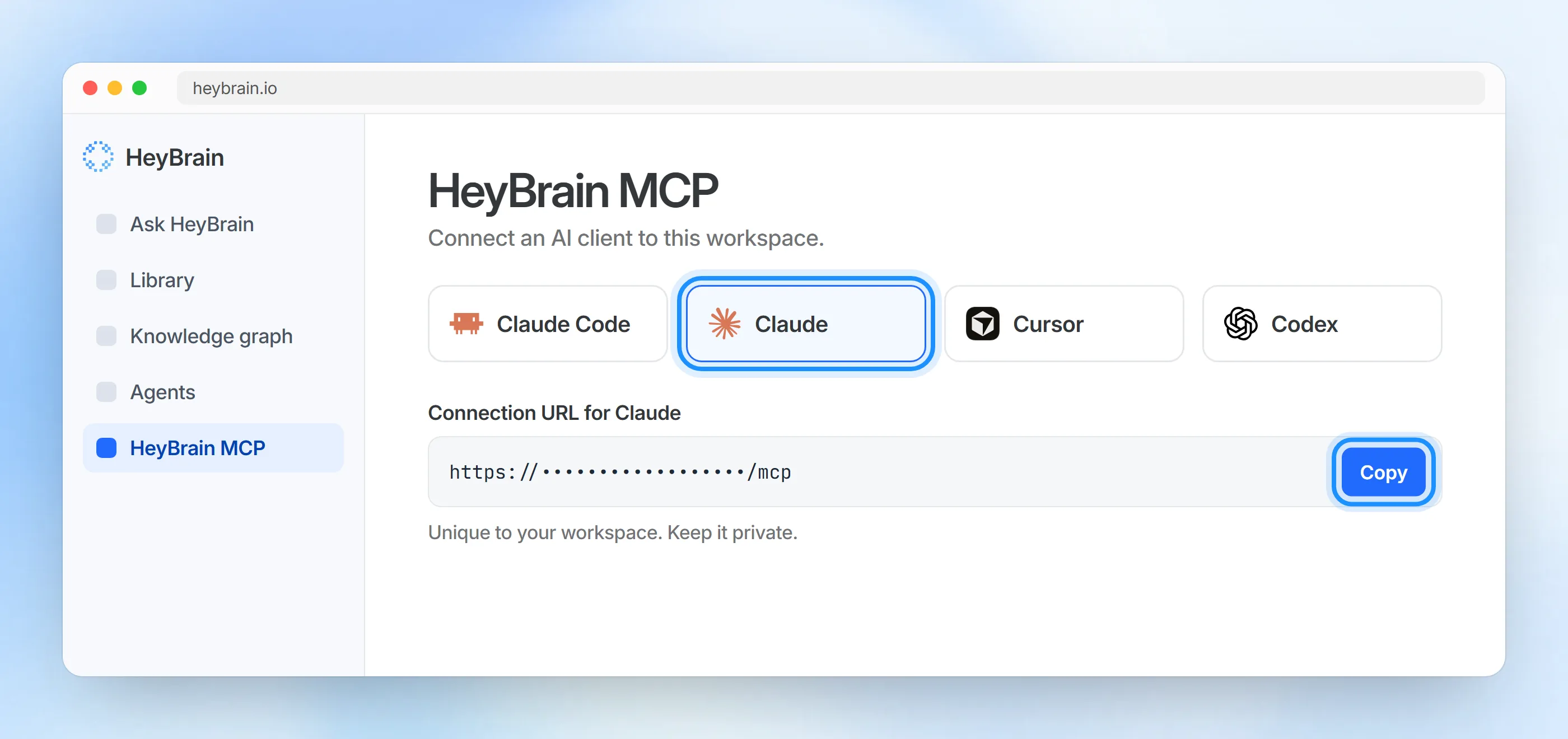
1. In HeyBrain, open HeyBrain MCP, choose Claude and copy your connection URL. It’s unique to your workspace, so keep it private.
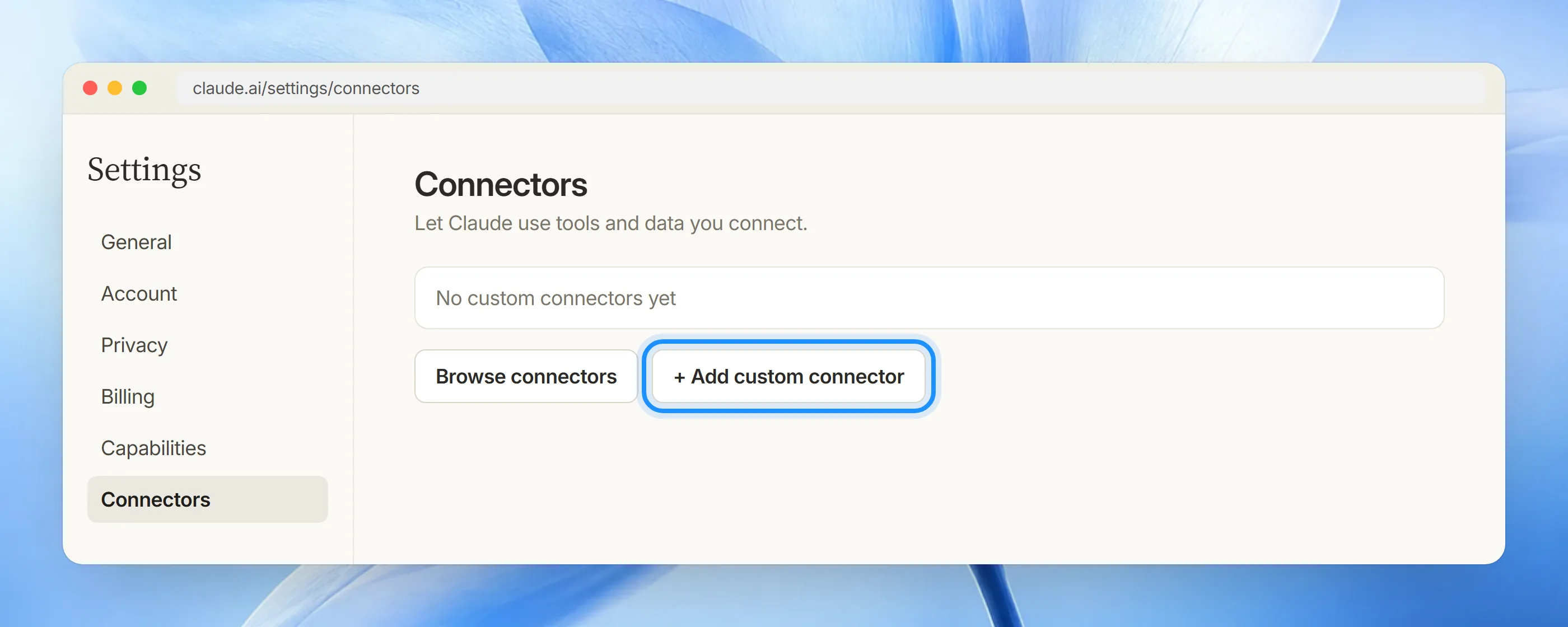
2. In Claude, open Customize → Connectors, click + Add, then Add custom connector.
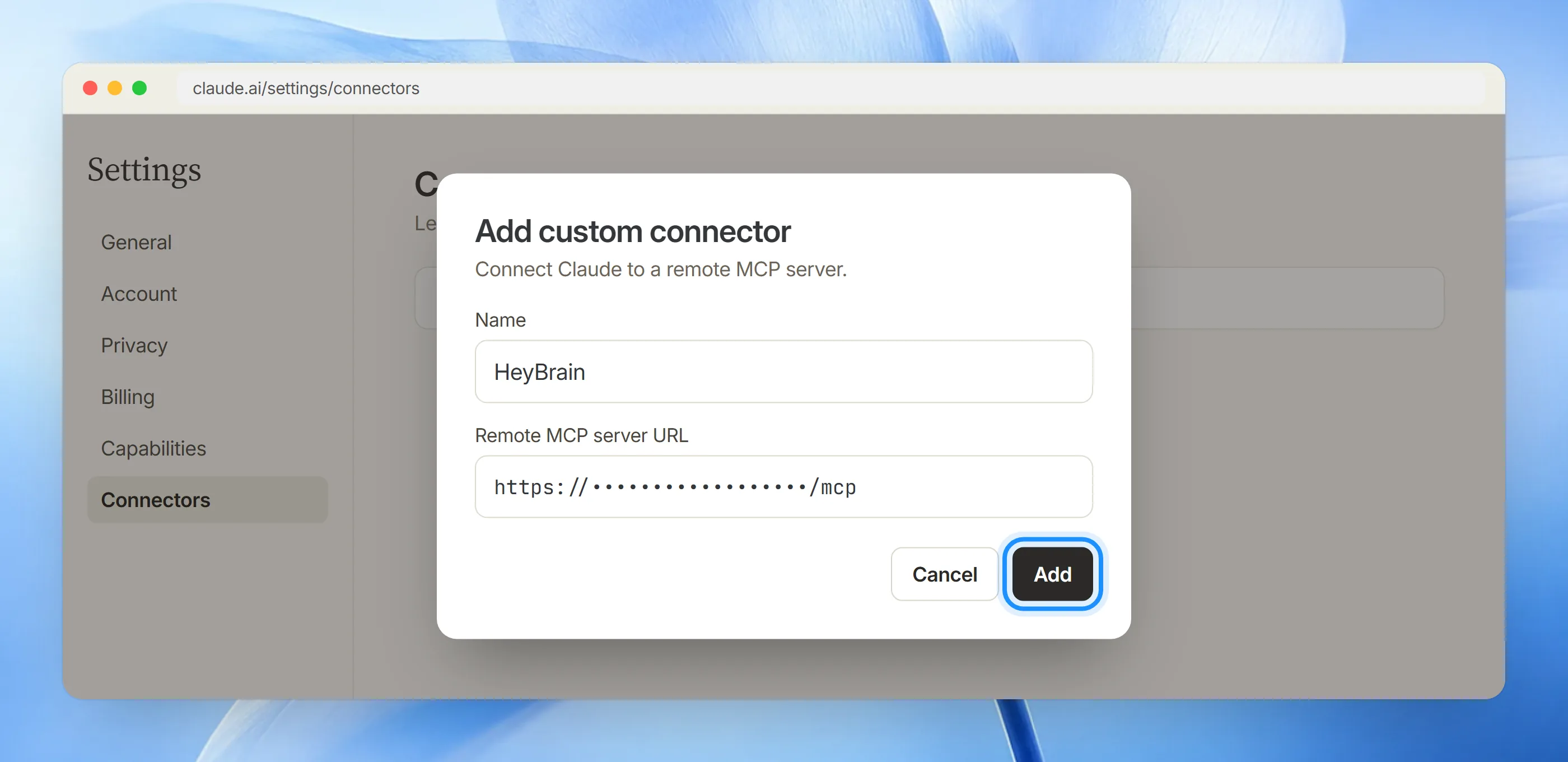
3. Name it HeyBrain, paste the URL, click through the prompts and click Add. Sign in to HeyBrain when it asks, and click Allow.
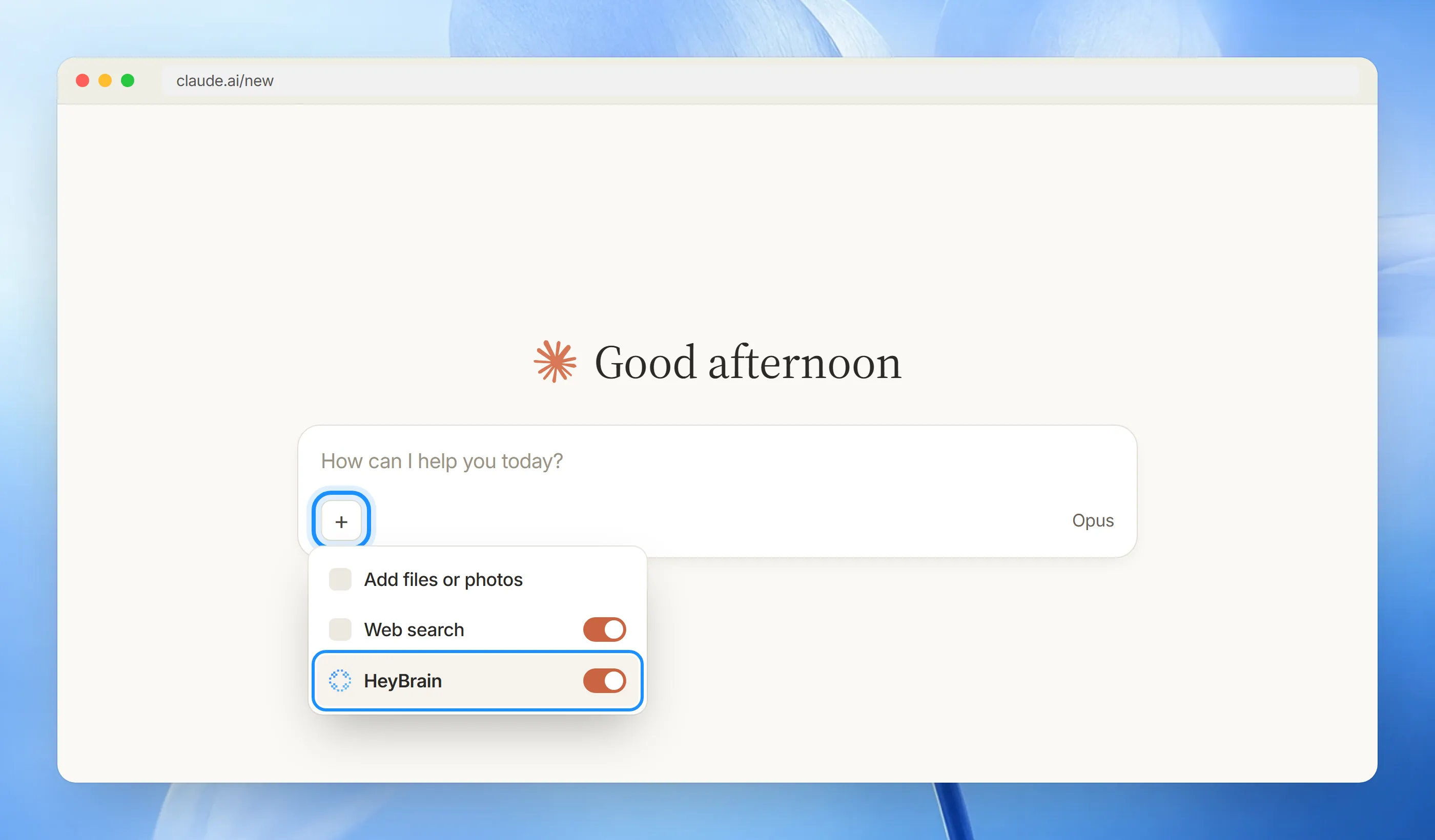
4. In a new chat, click the + and switch HeyBrain on.
Using Claude Code?
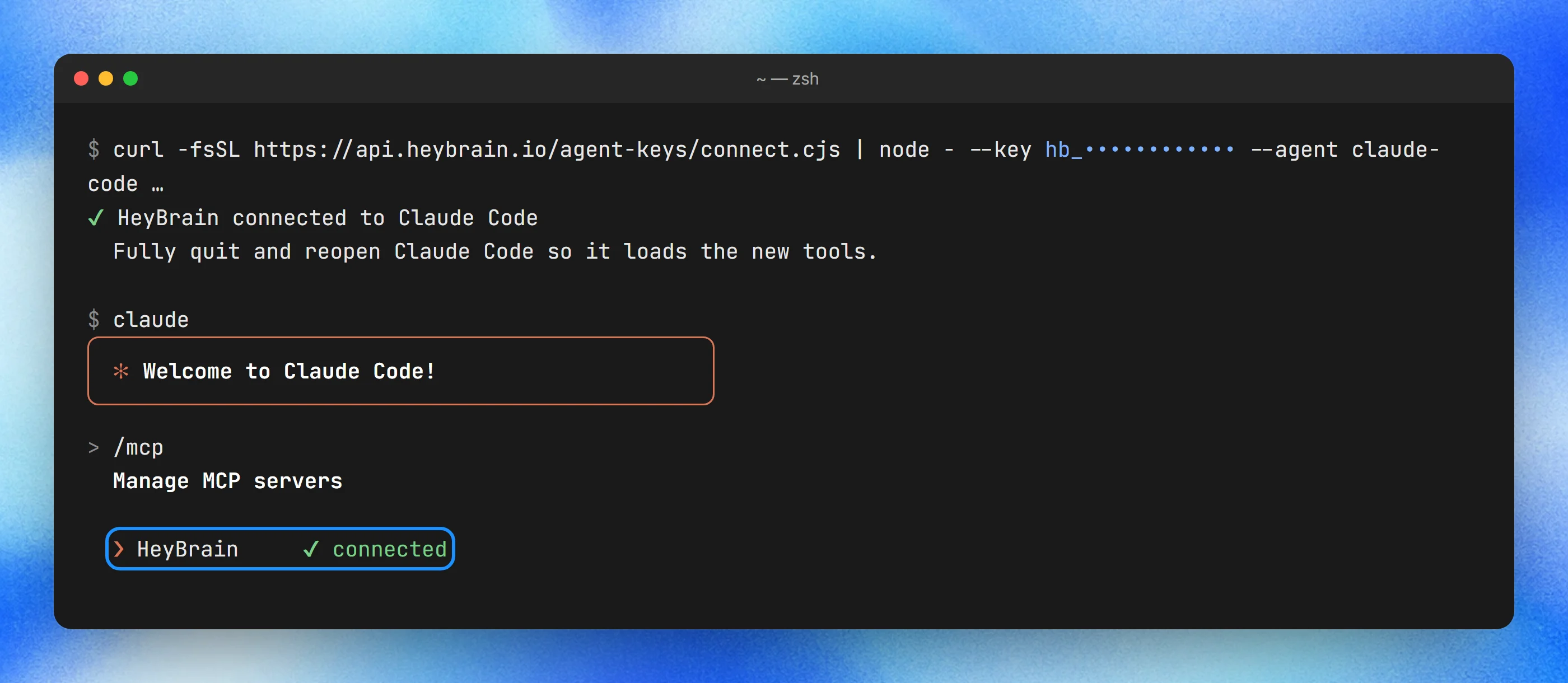
In HeyBrain, open HeyBrain MCP, choose Claude Code and copy the command it shows you. It carries your own key, so keep it private.
Paste it into your terminal and run it. Then fully quit and reopen Claude Code so it loads the new tools.
Type /mcp in Claude Code. You should see HeyBrain in the list, marked as connected. Cursor and Codex are on the same HeyBrain MCP page.
Check Claude can see your playbooks:
Check the brain
Open in ClaudeUse HeyBrain to list every playbook you can find in my docs. For each one, tell me the job it covers, the toolbox items it links to, and whether it has a Proof section.
Then run a real task on one. This is the prompt I use most:
Run a task on a playbook
Open in ClaudeUse HeyBrain to find my playbook for [the job] and the toolbox items it names. Use only those, not everything in the folder. Then do this task with it: [the task and any inputs]. Follow the steps in order and use the toolbox items wherever they fit. If the playbook doesn’t cover something, ask me instead of guessing, and note it as a gap. Before you hand back, run every Proof check and show me pass or fail for each.
Step 5: Fix the playbook, not the chat
This is the whole loop. When the agent gets something wrong, the instinct is to correct it in the chat. That fixes this one output, and the same mistake comes back next time. Fix the playbook the task runs on instead, and it stays fixed for every task after it.
Fix the playbook
Open in ClaudeThat’s not right: [what was wrong]. Don’t fix the output yet. First, find the part of the playbook that let this happen: a missing step, a vague rule, a missing toolbox item, or a check the Proof didn’t catch. Quote it. Then write the smallest change to the playbook that would stop this happening again, plus a new Proof check if one would have caught it. Show me the edit and a one-line changelog entry. Once I approve, I’ll save the change to the playbook. Then redo the task with the updated version.
Paste the approved edit into the playbook doc in Drive or Notion. The next task picks up the fixed version.
The full prompt set
The prompts above get your first playbook running. These are the ones I use once there are a few of them.
Keep an index of your playbooks
Once you have more than a handful, an index helps the agent pick the right one. Save it in the same Playbooks folder.
Write the playbook index
Open in ClaudeWrite an index for my playbooks. For each playbook, one line: its name, the job it covers, and the requests that should trigger it. Add this rule at the top: “For any task, check this index first, pick the one playbook that fits, and load only that one. If none fits, tell me, and offer to interview me for a new one.”
Turn a good chat into a playbook
Sometimes a chat just works. Don’t lose it.
Turn this chat into a playbook
Open in ClaudeThis chat went well and I want to repeat it. Read back through everything we did and write it up as a playbook with the headings Purpose, When to use it, Inputs, Steps, Rules, Toolbox, Proof and Changelog. List anything you made that should go in the toolbox, and write Proof checks based on what I approved or corrected along the way.
Review a playbook
Every so often, look at what the fixes are telling you.
Review a playbook
Open in ClaudeReview my [job] playbook. Read its changelog and the last few tasks we ran on it: [paste or describe them]. Tell me which rules never get used, which steps keep needing fixes, which Proof checks never fail (and may be too easy), and what’s missing from the toolbox. Suggest edits, smallest first. Don’t change anything until I approve.
Agents vs playbooks
Why I stopped building agents
| An agent per job | One agent + playbooks | |
|---|---|---|
| What you build | A new agent, with its own setup, each time | A doc, written by interviewing you |
| Adding a new job | Build and connect another agent | Write another playbook |
| When it goes wrong | Debug the agent, or correct it in the chat | Fix one line in the playbook |
| Reuse | Each agent makes its own files | The toolbox, shared by every task |
| Who can improve it | Whoever built it | Anyone who can edit a doc |
Questions people ask
Isn’t a playbook just a long prompt?
No. A prompt lives in one chat and disappears with it. A playbook is a doc that every task runs on, with a toolbox and a proof checklist attached, and it gets better each time you fix it.
How is this different from Claude skills?
It’s the same idea. A skill is Anthropic’s format for instructions an agent loads when a job comes up. I keep my playbooks as docs in Google Drive and Notion so every tool and my whole team read the same version.
Do I need Claude Code?
No. Steps 1 to 3 and 5 work in any chat. Step 4 works in the Claude app, and the Claude Code part is there if you use a terminal.
Can I use ChatGPT for this?
The interview and the playbook writing work in any AI chat. HeyBrain connects to Claude, Claude Code, Cursor and Codex today, so step 4 is written for those.
What does it cost?
Steps 1 to 3 cost nothing beyond your AI plan. HeyBrain has a 14-day free trial with a card required, then a paid plan. See pricing.
Is my data used to train models?
No. HeyBrain doesn’t train any model on the content you connect.

