

GBrain vs Obsidian vs HeyBrain: Which one fits how you work?
GBrain fits people and companies who want an open-source memory for their own AI agents, self-hosted or on gbrain.io. Obsidian fits people who write and link their own notes on their own devices. HeyBrain fits teams that want one shared, permission-aware knowledge layer inside the AI tools they already use, with nothing to host.
- GBrain is Garry Tan's MIT-licensed project: Markdown files (Git optional) plus a database index, installed with Bun, with optional paid hosting at gbrain.io.
- Obsidian is a free app that keeps notes as Markdown files on your devices; Sync adds shared vaults for up to 20 people.
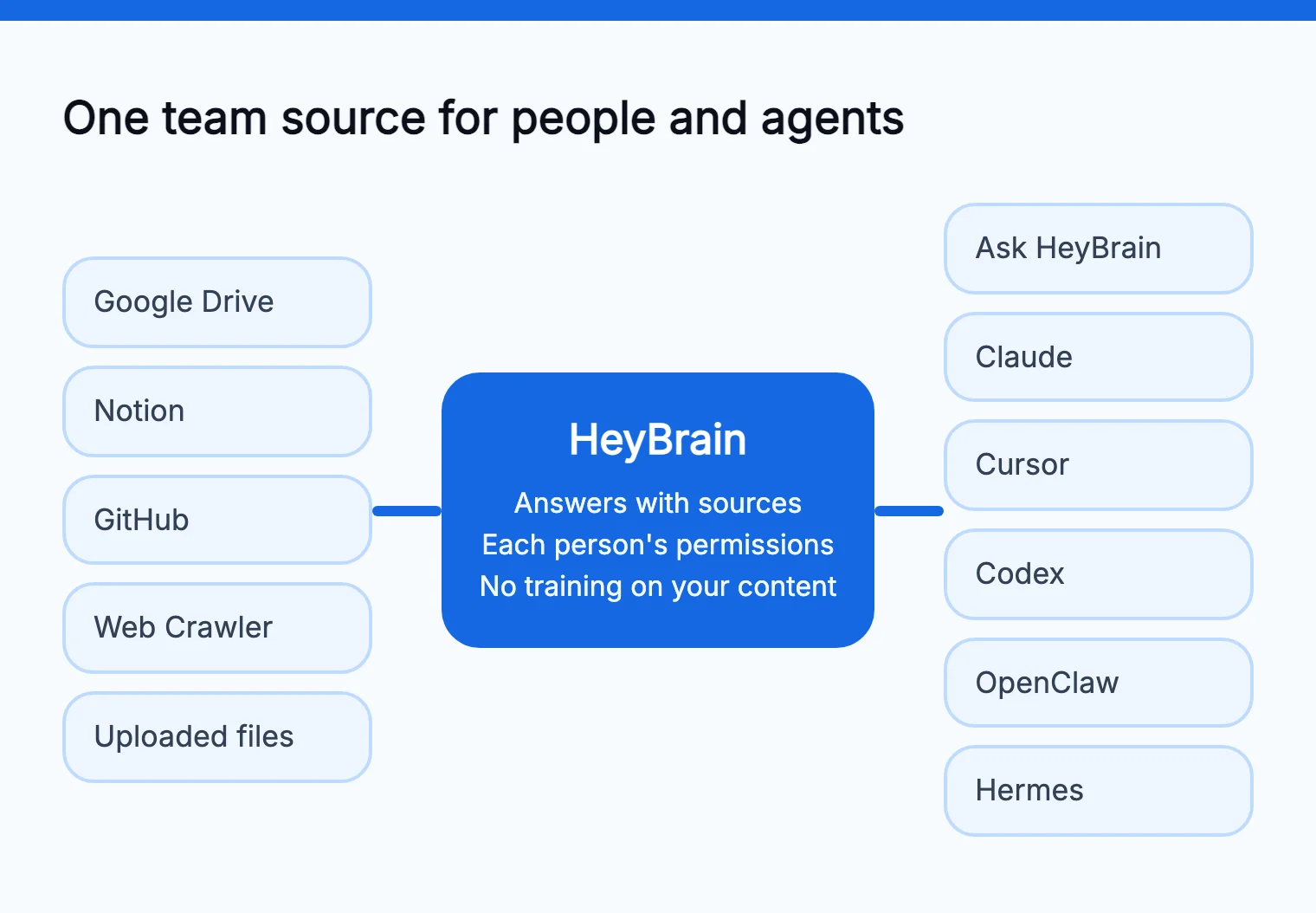
- HeyBrain is a hosted service that connects Google Drive, Notion, GitHub and more, and answers people and AI tools with sources under the permissions you set.
- They can work together: GBrain reads an Obsidian vault, and HeyBrain accepts Markdown uploads.
Contents

GBrain vs Obsidian vs HeyBrain
Which one fits how you work
What is GBrain?
GBrain is an open-source memory for AI agents that Garry Tan, President and CEO of Y Combinator, built to run his own agents. Despite the name, it has nothing to do with Google: it is Tan's own project on GitHub. GBrain keeps your knowledge as Markdown files in a folder, with Git optional, and a database index on top that agents search over MCP (Model Context Protocol, an open standard that lets AI tools call outside services).
The project moves fast. Its first release came on April 5, 2026, and a new version shipped on November 24, 2026. Details such as its permission model change between releases, so check the current README before you rely on one.
How do GBrain, Obsidian and HeyBrain compare?
GBrain, Obsidian and HeyBrain differ most on what they are built around: a memory you run for your own and your company's agents, notes one person writes, or a hosted source a team and its AI tools share. HeyBrain is our product. Every other tool is described from its maker's own pages, checked on November 24, 2026.
| GBrain | Obsidian | HeyBrain | |
|---|---|---|---|
| Made by | Garry Tan, as his own open-source project | The Obsidian team; the app is user-supported | HeyBrain (our product) |
| What it is | Memory and search for AI agents, built on Markdown | A note-taking app for your own linked notes | A shared knowledge layer for teams and their AI tools |
| Open source | Yes, MIT license | No; a proprietary app, free for any use | No; a hosted service |
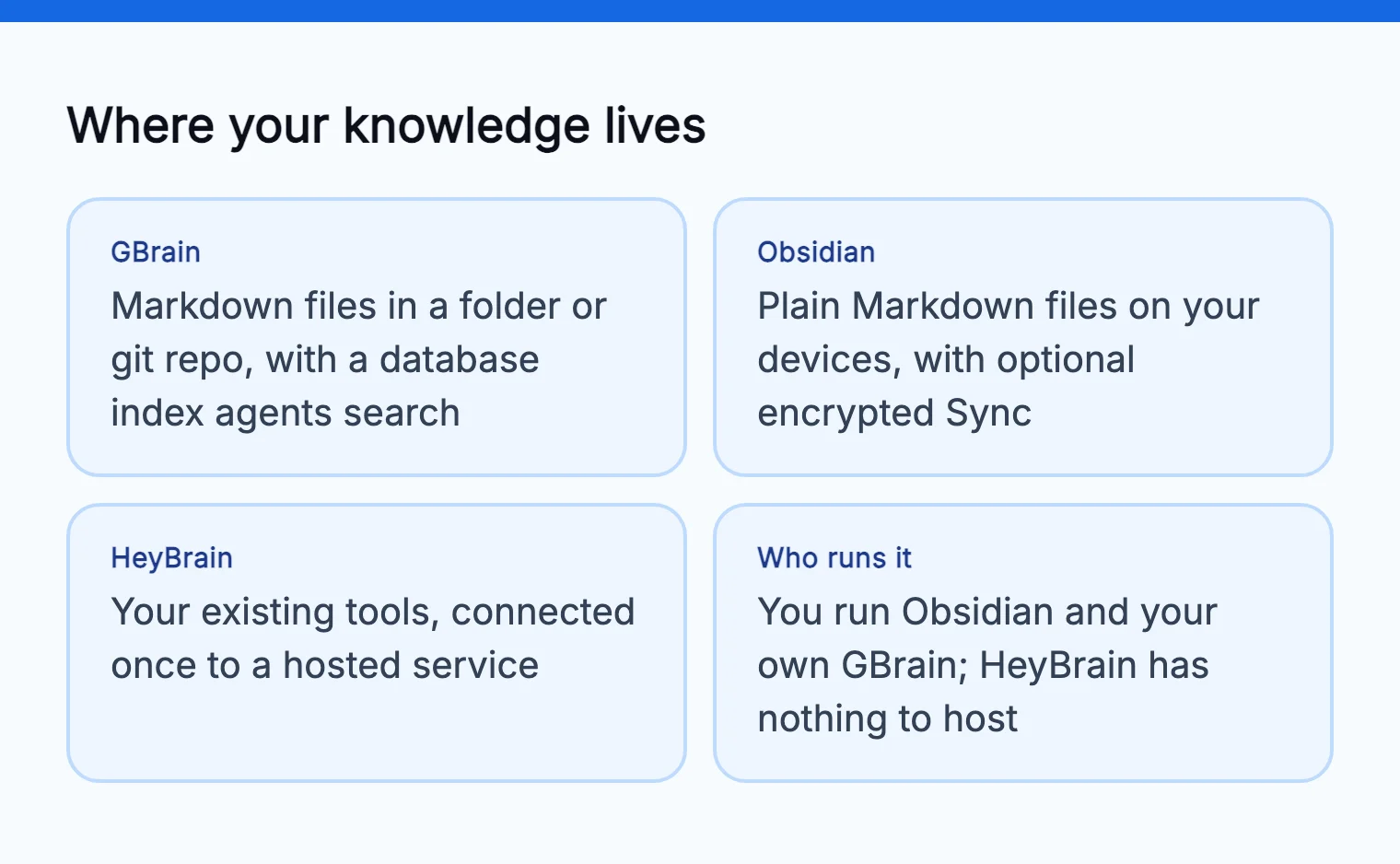
| Where your data lives | Markdown files in a folder (Git optional) plus a database index (PGLite by default, or Postgres with pgvector); or gbrain.io hosting | Plain Markdown files on your devices; optional end-to-end encrypted Sync | Your existing tools, connected to HeyBrain's hosted service |
| Setup | Bun 1.4.4 or newer, installed from GitHub (not npm); or hosted at gbrain.io | Download the app for desktop or mobile | Sign up and connect your sources; nothing to install or host |
| Built for | You and your company's agents, run on your own machines or on gbrain.io | People writing and linking their own notes | Teams whose people and AI tools need the same answers |
| Team sharing and permissions | Self-hosted: source and operation grants plus visibility filters for authenticated remote clients; hosted Team plan puts everyone in one workspace | Shared vaults through Sync for up to 20 people, all with the owner's permissions; no live co-editing yet | Answers under the permissions you set, for each person and AI tool |
| AI tools it works with | Its MCP server (local, remote or hosted), with guides for Claude Code, Codex, Cursor, ChatGPT, OpenClaw, Hermes and more | No built-in AI; Obsidian CLI and official Skills let agents use a vault; official MCP is on the roadmap | Ask HeyBrain; Claude, Cursor and Codex over MCP; OpenClaw and Hermes over MCP |
| Record of access | A record of every action on every gbrain.io plan; the self-hosted README doesn't describe one | Not published; Sync keeps version history | Record of which person asked each question, on every plan; audit records on team plans |
| Price | Free to self-host; gbrain.io hosting from $49 a month (Team $199) | Free; Sync $4 per user a month billed yearly | Published plans, with a 14-day Pro trial (card required) |
| Best for | People and teams who want to run their agents' memory themselves | One person who wants notes they own | A team sharing knowledge across people and AI tools |
What does GBrain do well?
GBrain does well at giving your agents, and your company's, a deep memory you fully control. It is MIT-licensed, free to self-host and starts with no API keys: search works by keyword until you add one. Markdown is the source of truth, and the database is an index you can rebuild from it, though pages that exist only in the database, and their history, need a database backup. PGLite, the default engine, suits personal brains of up to about 50,000 pages; Postgres with pgvector covers shared, larger or multi-machine setups.
Agents reach it over MCP, either locally, remotely through Tailscale or through the hosted endpoint at gbrain.io. Tan runs it as the production memory behind his own OpenClaw and Hermes agents, and the README includes setup commands for Claude Code, Codex and Hermes, plus guides for other clients.
What to check: GBrain's README says authenticated remote clients are limited by source and operation grants plus visibility filters, but that local files and shared database credentials are a different trust boundary. Sharing one self-hosted GBrain safely takes careful setup. Hosting on gbrain.io costs $49 a month for Personal and $199 for Team, with Enterprise on request. Every plan includes a record of every action, but the pricing page doesn't say which plan includes single sign-on or members and roles.
What does Obsidian do well?
Obsidian does well at giving you notes you own. It is a free app that stores notes as plain Markdown files on your device, runs on Mac, Windows, Linux, iOS and Android, and adds a Web Clipper for the major browsers. It is free for all purposes, including commercial use, with an optional commercial license at $50 per user per year.
For sharing, Obsidian Sync ($4 per user a month billed yearly) lets a vault owner invite up to 20 collaborators. Each one needs their own Sync subscription, everyone gets the owner's permissions, and two people can't edit the same file live yet; changes are merged on sync. Obsidian's own shared vault documentation sets out the rules.
AI is not built in. Obsidian CLI, launched in February 2026, lets agentic tools work with your vault, official Skills followed in November 2026, and an official MCP connection is listed as in progress on the roadmap. Community plugins add more, from third parties. For team options, see HeyBrain vs Obsidian and the best Obsidian alternatives for teams.
What does HeyBrain do well?
HeyBrain does well at giving a whole team, and its AI tools, the same sourced answers with nothing to host. It connects Google Drive, Notion, GitHub, the Web Crawler and file uploads, with Slack, Gmail, Google Calendar, Fireflies and PostHog in beta. People ask in Ask HeyBrain, while Claude, Cursor and Codex ask over MCP.
Each answer cites its sources and stays within the permissions you set, and HeyBrain doesn't use connected content to train AI models. HeyBrain also keeps a record of which person asked each question, on every plan. What to check: HeyBrain is hosted rather than self-hosted, and its connector list is shorter than the largest suites'. Plans and limits are on HeyBrain's pricing page.
Can you use GBrain, Obsidian and HeyBrain together?
Yes, in a few ways the tools themselves support. GBrain's README says to point it at a folder of Markdown notes and that an Obsidian vault works, so GBrain can index notes you already keep in Obsidian. HeyBrain's upload accepts Markdown files alongside PDFs and documents, so notes from a vault can join your team's knowledge.
OpenClaw and Hermes, the agents GBrain was built around, can also connect to HeyBrain over MCP: see HeyBrain for OpenClaw and HeyBrain for Hermes. A practical split is to keep private notes in Obsidian or GBrain and put what the team needs to share in HeyBrain, where each person's access applies. The risks of pointing a model at a vault are covered in AI for Obsidian.
How do you move from a personal brain to a team brain?
A personal brain works until other people need the same answers. At that point three things change: who may see what, a record of who asked, and reach into every AI tool the team uses. GBrain's grants and Obsidian's shared vaults cover part of that; HeyBrain is built for all three.
HeyBrain's guide on moving from a personal second brain to team knowledge walks through what needs to change, from permissions to ownership of shared sources.
Which one should you choose?
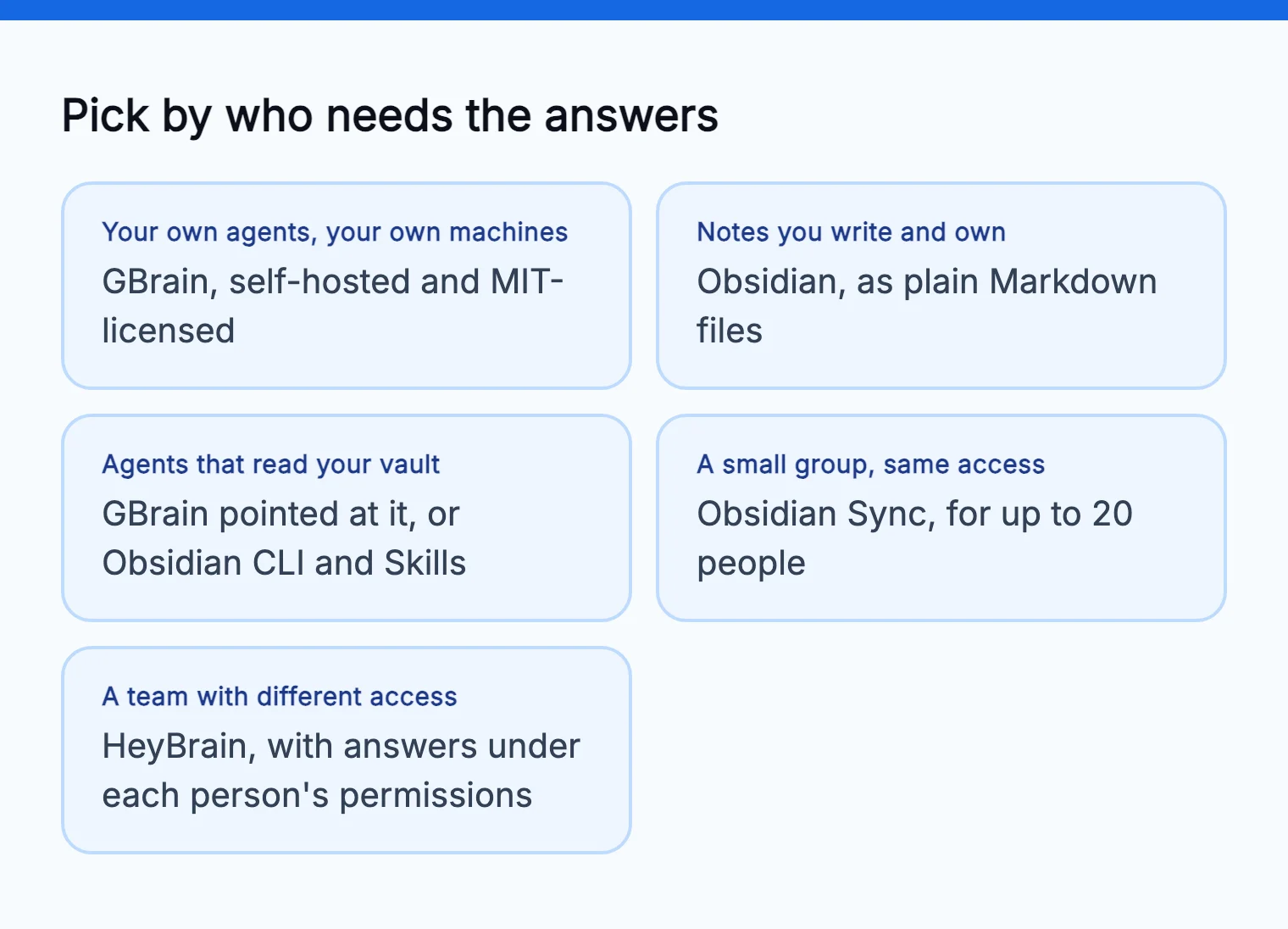
Choose by who needs the knowledge and who will run it. These five situations each have a clear fit, including the ones where HeyBrain is not the pick:
- You run your own agents, alone or as a company, and want their memory under your control: GBrain.
- You write and link your own notes and want plain files you own: Obsidian.
- You live in Obsidian and want your agents to use it: GBrain pointed at your vault, or Obsidian's own CLI and Skills.
- A small group shares one vault and everyone can have the same access: Obsidian Sync, for up to 20 people.
- A team whose people and AI tools need the same sourced answers under different access: HeyBrain.
Frequently asked questions
What is GBrain?
GBrain is Garry Tan's open-source memory for AI agents. It stores knowledge as Markdown files in a folder, with Git optional, and a database index, and agents search it over MCP. Tan built it to run his own OpenClaw and Hermes agents. It is MIT-licensed and free to self-host, with optional paid hosting at gbrain.io. It is not a Google product.
Is GBrain free?
Yes, to self-host. GBrain is MIT-licensed and free to run on your own machines, and it needs Bun 1.4.4 or newer. As of November 24, 2026, hosted plans on gbrain.io cost $49 a month for Personal and $199 a month for Team, with Enterprise pricing on request.
Can GBrain read an Obsidian vault?
Yes. GBrain's README tells you to point it at a folder of Markdown notes and says an Obsidian vault works. Your notes stay as Markdown files, and GBrain builds a searchable index on top for your agents. A walkthrough for migrating an existing Obsidian vault is listed as in progress.
Is GBrain good for teams?
Yes, with care. The README pitches GBrain as one brain for you and your company and includes a tutorial for a 10 to 50 person team. It also says authenticated remote clients are limited by grants and visibility filters, but local files and shared database credentials sit outside that boundary. A hosted Team plan puts everyone in one workspace. HeyBrain is built for teams from the start, with answers under each person's permissions.
Does Obsidian have AI memory?
Not built in. Obsidian stores your notes as Markdown files, and agents can work with a vault through Obsidian CLI and the official Skills launched in November 2026. An official MCP connection is listed as in progress on Obsidian's roadmap. Community plugins add AI features, from third parties.
Can I use HeyBrain with OpenClaw or Hermes?
Yes. OpenClaw and Hermes connect to HeyBrain over MCP, with setup instructions inside your HeyBrain workspace. They then answer from your team's connected sources with citations, under the permissions you set, alongside Claude, Cursor and Codex. The HeyBrain for OpenClaw and HeyBrain for Hermes pages cover the steps.
Which is best for a team?
HeyBrain, if people and AI tools need the same sourced answers with different access for different people. Obsidian Sync suits small groups that can all share one vault with the owner's permissions, up to 20 people. GBrain can be shared, but self-hosted sharing needs careful setup, and its hosted plans don't say which include roles and SSO.
Pick GBrain to run your own agents' memory, Obsidian to keep notes you own, and HeyBrain when your team and its AI tools need one shared, permission-aware source of knowledge.