
To ask your AI brain a first question, open Ask the brain in the workspace containing your document and ask about a fact you can check. Read the answer, expand the source list and open the cited document. Compare the facts with its text; an authentic answer signature does not replace that comparison.
At a glance
- Name the project or document and ask for a specific fact.
- Check the workspace before submitting the question.
- Expand the source list and compare the answer with the original.
- Use Verify for authenticity, then check the facts yourself.
Before you start
- A Brain account with access to the workspace containing your document.
- A document you have opened and inspected. If you need one, follow uploading knowledge to Brain.
- An available model and a question with a clear answer in that document. The demonstration used GPT 5.6 luna; inspect your current model choices.
Ask a question and check its source
Measured walkthrough:
1. Ask about one document
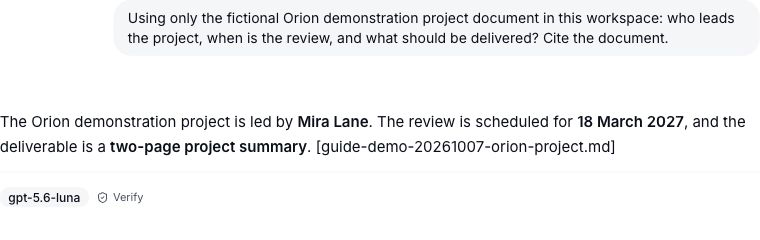
Open Ask the brain in the right workspace. Enter a specific question in Ask your brain. For example: “Using only the Orion project document, who leads the project, when is the review, and what should be delivered? Cite the source.” Submit once.

2. Read the answer and expand its source
Read the answer, then select 1 source, show list where shown. The fictional example returned Mira Lane, 18 March 2027 and a two-page project summary. Select the exact cited document from the expanded list.
3. Compare with the original document
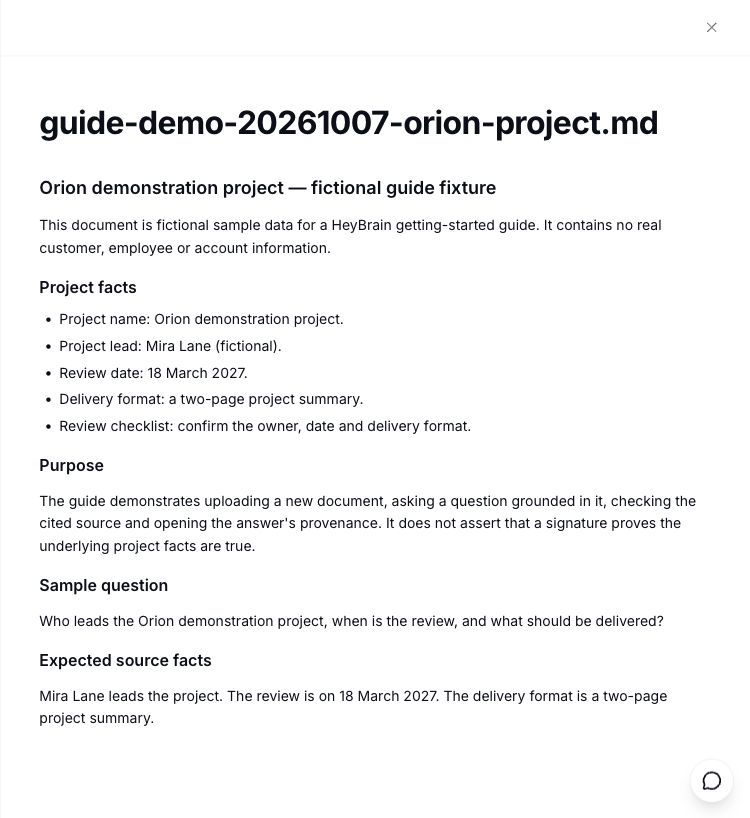
The demonstrated citation opened the file’s Library panel. Select View document and check that each answer fact appears in the original text. Keep checking dates, names and qualifications when you ask about your own knowledge.
How long did the walkthrough take?
The demonstrated Ask, Verify and source-navigation flow took 208.333 seconds, rounded to 3 minutes 29 seconds above.
That includes agent interactions and interleaved observation. The answer was observed within 29.790 seconds after submission. These are measurements of one demonstration, not guaranteed response or task-completion times.
What makes a useful first question?
Name one subject and ask for information the document actually contains. Request a source so you can inspect it.
Try a coordinator and review date, a recorded decision, or a step in a procedure. These are suggested prompts. Start with one source before asking for comparisons across several documents.
What does Verify establish?
The demonstrated Verify result displayed Signature verified — authentic Brain answer.
Where available, select Verify to inspect the issued answer proof. A valid signature establishes authenticity; it does not establish that every fact is accurate. Compare the answer’s names, dates and claims with its source.
What if the document does not contain the answer?
Check the original text before accepting a detail you cannot find.
Ask a narrower question and explicitly allow the answer to say that the information is missing. A citation or authentic signature is still a reason to inspect the source, not a substitute for inspecting it.
Can I ask from an agent or another client?
The published Codex setup page describes Brain’s MCP workflow. This walkthrough tested the web app.
Follow the current Codex setup page for that client and verify the intended identity and workspace. Installation, consent and equivalent retrieval from other clients were not exercised here. Read AI audit logs for background on the record of an answer.
What should I check if an answer is unexpected?
Check the workspace, the document and the cited source.
If the wrong knowledge appears, stop and inspect those details. If the citation is missing or cannot open, preserve the answer and check the actual destination. If a fact is unsupported, compare it with the original and ask a narrower question. Do not rely on the answer’s signature as a fact check.
Questions, answered
What is a good first question to ask an AI brain?
Ask for a fact you can check in one document, and name the project or policy involved. A project coordinator, review date and deliverable made a useful first test in the fictional Orion example. Request a source, compare the answer with the original, then expand to broader questions once that check works.
Why can’t Brain find a detail?
The selected knowledge may not contain it. Check the workspace and open the relevant document before assuming a system failure. Ask a specific question and allow the answer to say that information is missing. If it provides an unsupported detail, compare with the original rather than accepting the answer without checking.
How do I open the source behind an answer?
In the demonstrated web flow, the answer showed one source. Expanding 1 source, show list exposed the document link; selecting that exact link opened its Library panel. Choose View document and compare the text with the answer. Inspect your own result: this example does not guarantee citations for every model or question.
Does a verified answer mean its facts are correct?
The demonstrated Verify result established that the issued answer’s signature was valid and the answer authentic. It did not establish the accuracy of every statement. Continue checking names, dates, amounts and other claims against the original document. Authenticity and support for the answer’s facts are two separate checks.
Can I use Codex instead of the web app?
Brain’s published Codex setup page describes its MCP workflow. Follow the current instructions and confirm your intended account and workspace before connecting. This walkthrough exercised web questions and source navigation; it did not test client installation, consent or equivalent retrieval. Use the setup page for the client procedure.
You have checked a specific answer against its source. Keep that habit as you add more documents and ask broader questions.